Workload Management for Agencies: Plan Capacity, Meet Deadlines
Learn workload management for agencies with four practical steps to plan team capacity, prioritize requests, and avoid missed deadlines.

Adetola Rachael Iyanuoluwa

Workload management for agencies means tracking how much work your team can take on every week and when they're at capacity, and using that information to deliver consistently without over promising clients.
Most agencies discover they're overloaded after they've already missed a deadline, or had to apologize to a client.
Put yourself in the shoes of your project manager for a minute. A new request lands. Someone has already promised the client a turnaround. Your PM looks at the queue, counts what is open, and realises the only way this works is if nothing goes wrong all week, and something always goes wrong.
That's a capacity problem, and it gets worse in a subscription agency because the request never stops coming in.
This guide covers how to plan capacity by role, set intake limits that protect delivery quality, spot overload before it becomes a crisis, and which workload management software gives you visibility into all of it.
Project agencies finish things. You scope a website build, deliver it, invoice, and the work leaves your queue. Capacity planning in that world is mostly about when a task starts, and who's free to pick it up.
Subscription and retainer agencies do not get that. They get more requests whether or not they finish last week's queue. A client on an unlimited design plan submits their next brief the moment you deliver the last one, because that is what they are paying for. And you're working with more than one client.
That changes what capacity actually means. In a project business, being at capacity is a temporary state you work through. In a productized business, being at capacity is a structural condition that can affect your delivery unless you plan a way around it.
The upside is predictability. If you know your average client submits four requests a month and you have fifteen clients, you know roughly what next month looks like before it arrives. Project agencies rarely have that. They could have a lot of work this month, and less next month.
That said, it's easy to miss your team being overloaded until it's too late. And it's not just you, most agencies are not measuring closely enough to catch it either. AgencyAnalytics surveyed 251 agencies and found that 45.8% agencies surveyed find it hard to allocate billable time. If you can't track the hours, it's hard to know when one team member is overloaded and how to redistribute their workload, or at least, not add another one.
Four things decide whether your team is able to manage their workload properly:
So how do you plan for all of this?
Say you've got a designer on payroll for 40 hours a week. You won't get 40 hours of client work out of them. Internal reviews eat some of that time, and so does chasing clients to explain what they meant in the brief.
So plan around actual delivery hours, not total working hours. A designer working 40 hours a week won't spend all 40 on client projects. Internal reviews, meetings, revisions, and administrative tasks take up time, too. Use your team's historical time tracking data to estimate realistic delivery capacity, then leave some buffer for unexpected requests.
Your clients don't care about hours, though. They send you requests. So work out how many your team can actually ship. DesignGuru gives you a sense of what's possible: 15 designers and project managers, over 1,500 projects in under a year, about 30 requests a week.
If you want your own number, pull every request you finished in the last two months, add up the hours, and divide by the request count. That's your average. Then divide each person's weekly billable hours by it. Parakeeto, an agency profitability consultancy, has a utilization rate calculator that can be useful if you want to pressure-test the figure.
Intake limits are how you stop more tasks than your team can handle coming in.
The mechanism most productized agencies use is a cap on active requests per client. One active request at a time on a standard plan, two or three on a higher tier. A client can submit as much as they like, but only the agreed number moves into production at once. The cap is what makes your turnaround promise possible.
Once work is in the queue, sequence it by deadline, not by arrival order or by whoever emailed you last.
A client launching a campaign in two weeks needs their designs before a client still researching a whitepaper needs a first draft.
So ask for the deadline on the intake form, and ask what the work is for. Your team then reads priority off the request instead of guessing at it on a Monday morning.
Check the queue before you promise a turnaround.
Quote from your delivery data. If your average design request takes three days and your worst week takes five, promise five. You earn more goodwill beating your own deadline than scraping past an aggressive one.
When a client pushes for faster, three things can happen:
Saying yes and hoping is not on that list, and it is how most scope creep starts.
A request queue is the single view of every piece of client work in your agency, from submitted to delivered.
If you have a working project management portal, it should look like this:
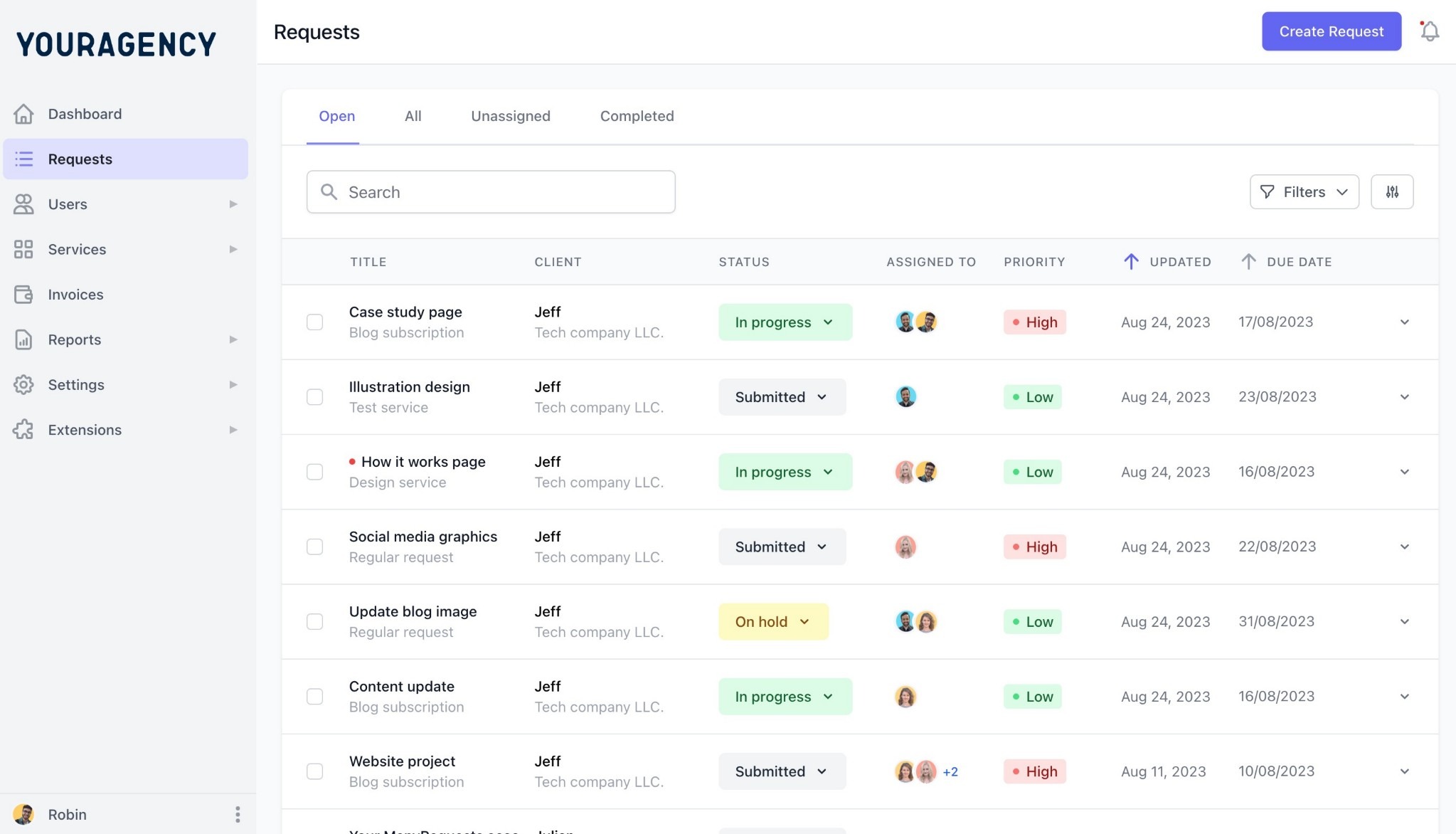
A request queue replaces the mental arithmetic you’d have to do to remember what your clients sent via email, Slack, and three other project boards.
Start a week with 12 open requests across 6 clients. Here is what you actually do with that:
Workload management in ManyRequests shows the assignment picture in real time, so you can see who is carrying too much before the person tells you, which they usually do late or not at all.
ManyRequests filters the same queue by account manager, status, due date, and client tag, so a project manager running one book of clients sees only their slice while the owner sees the whole business.
There are three ways to find out if your team is overloaded:
One more thing you could overlook is that agencies lean on their best people. Two or three team members do most of the work while everyone else has room, so your capacity looks fine on paper. In practice it's whatever those two or three can take before they quit. So make sure you're not putting the whole burden on few people.
None of these require a new tool if you already have a queue and time tracking tool. Time tracking is what connects capacity to money, since the same data that shows who is overloaded also shows which clients absorb more delivery hours than they pay for. Ask your team directly as well, and ask specifically.
Look for these four things when you're picking a tool to manage your agency’s workload:
Based on these criteria, these are the tools that are useful for workload management:
ManyRequests is a white-label client portal and agency management platform built for productized agencies, and it covers all four criteria.
The request queue gives you every client request in one place, filterable by account manager, status, due date, and client tag.
ManyRequests also has a Workload Management feature that shows you who on your team has room and who doesn't.
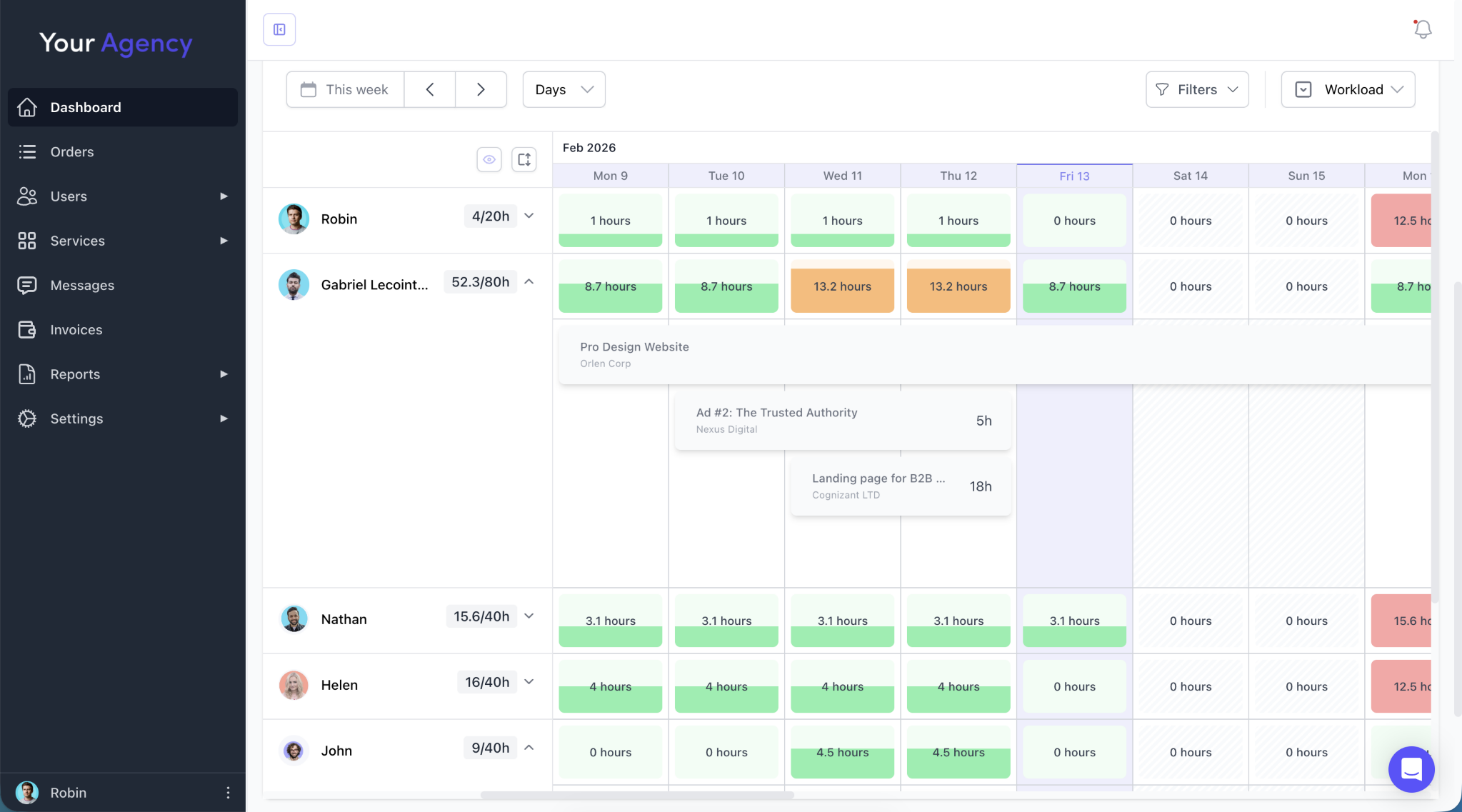
It lists each person, what they're working on, and how much more they can take this week. So you assign new requests to whoever has capacity instead of asking around or guessing.
It also saves you from finding out too late. If someone is overloaded, you see it in the view before they have to tell you. You can also see which clients take up the most time, and whether their plan covers it this way. The only caveat is that it's on the Pro plan.
Asana, monday.com, and ClickUp all offer workload management features and work well for internal teams. However, productized agencies may need additional tools or configurations to manage client requests, subscriptions, billing, and workload in one place. ManyRequests brings these workflows together in a client-facing platform built specifically for agencies.
You can compare the full field in our roundup of the best workload management software for creative agencies.
If you run a productized agency and want visibility into your team's workload in real time, ManyRequests is built for this. Start your free trial.
Workload management in a productized agency comes down to knowing your team's real weekly capacity, and capping what you let in so you never exceed it. Start with the measurement. Pull your last two months of delivered requests and work out your true average per role. Then put limits and visibility around that number so it holds under pressure.
ManyRequests gives productized agencies the request queue, and real-time workload view to run all of it from one place. Start your 14-day free trial, no credit card required.
Work it out from your own delivery data rather than a benchmark. Divide the hours your team spent on delivery over the last two months by the number of requests completed, and you have your true average per request. Divide each person's available delivery hours by the average hours per request, then plan to use 65–80% of that capacity to leave room for revisions and unexpected work.
Yes, for most subscription and retainer models. A cap on active requests is what makes a turnaround promise possible. Clients can submit as much as they like, but only the agreed number moves into production at once.
You have three options. Pause new requests until the queue clears, change your plan tiers so clients can't send more than you can ship, or bring in a freelancer. Try the first two before the third. Most agencies that hire at this point are still carrying work they'd lose if they fixed their briefs.
1. See how ManyRequests works in real life. Start a free trial and experience how productized agencies centralize requests, reduce chaos, and streamline delivery, without changing their entire workflow.
2. Read our Implementation Guide to launch smoothly with your team and clients.
3. Follow us on LinkedIn and YouTube for practical agency growth strategies
4. Check out The Productize Blueprint to learn how to turn your services into a scalable, productized offer.
Adetola Rachael Iyanuoluwa is a B2B SaaS writer and content marketer with 4+ years of experience creating SEO, human-focused content. She writes in-depth how-to guides and comparison articles content that help SaaS companies grow organic traffic and turn readers into customers. At ManyRequests, she produces practical, well-researched content that helps agencies and service businesses streamline operations and scale sustainably.