I Reviewed 6 Zoho CRM Alternatives for Agency Owners in 2026
Looking for Zoho CRM alternatives? Here are the 6 best options for creative agencies that manage clients, projects, and billing in one place.

Peace Akinwale
Zoho CRM is designed to track leads, manage pipelines, and personalize support at every touchpoint. For $20/user/month, its Standard plan includes workflow automation, custom modules, and integration with 40+ Zoho apps. And that’s great for a sales team.
But an agency, your client needs to submit their requests, you need a place to manage every assignment, and your team needs to communicate with you faster.
In the best case, you’d subscribe to other Zoho Project and Zoho Books to manage your team and invoice your clients.
And this is precisely how their everything-approach becomes “overwhelming for new users," according to a reviewer. Multiple users have also reported that the initial setup and customization (is definitely) … overwhelming”, which is expected for many client management software for agencies.
However, Zoho’s learning curve is much steeper. A user mentions that the “advanced features require technical knowledge or the help of Zoho support.”
Another user writes that for someone trying to streamline their business, Zoho can “feel more like trying to navigate a complex enterprise system than a tool meant to help."
Your agency doesn’t need a complicated agency CRM software, so I:
Btw, I want to clarify that Zoho CRM isn't wrong for everyone. Here are three scenarios where it works well:
1. Lead-gen agencies who close deals without handling the projects: If you hand clients off to someone else after they sign, Zoho's sales focus is perfect. You don't need project management or client portal features; the pipeline tracking feature is enough.
2. Agencies deep in the Zoho ecosystem: If you already use Zoho Mail, Campaigns, or Analytics, adding the CRM helps centralize your data. The learning curve also reduces as your team already knows their way around.
3. Enterprise agencies with 100+ employees: At this scale, you might love how Zoho lets you monitor all deals and personalize support on several platforms. The complexity would make sense for the customizations, and you can have dedicated admins to build workflows that would be definitely overwhelming for smaller teams.
But for everyone else, the 5-50 person creative agencies, you need one of these Zoho CRM competitors.
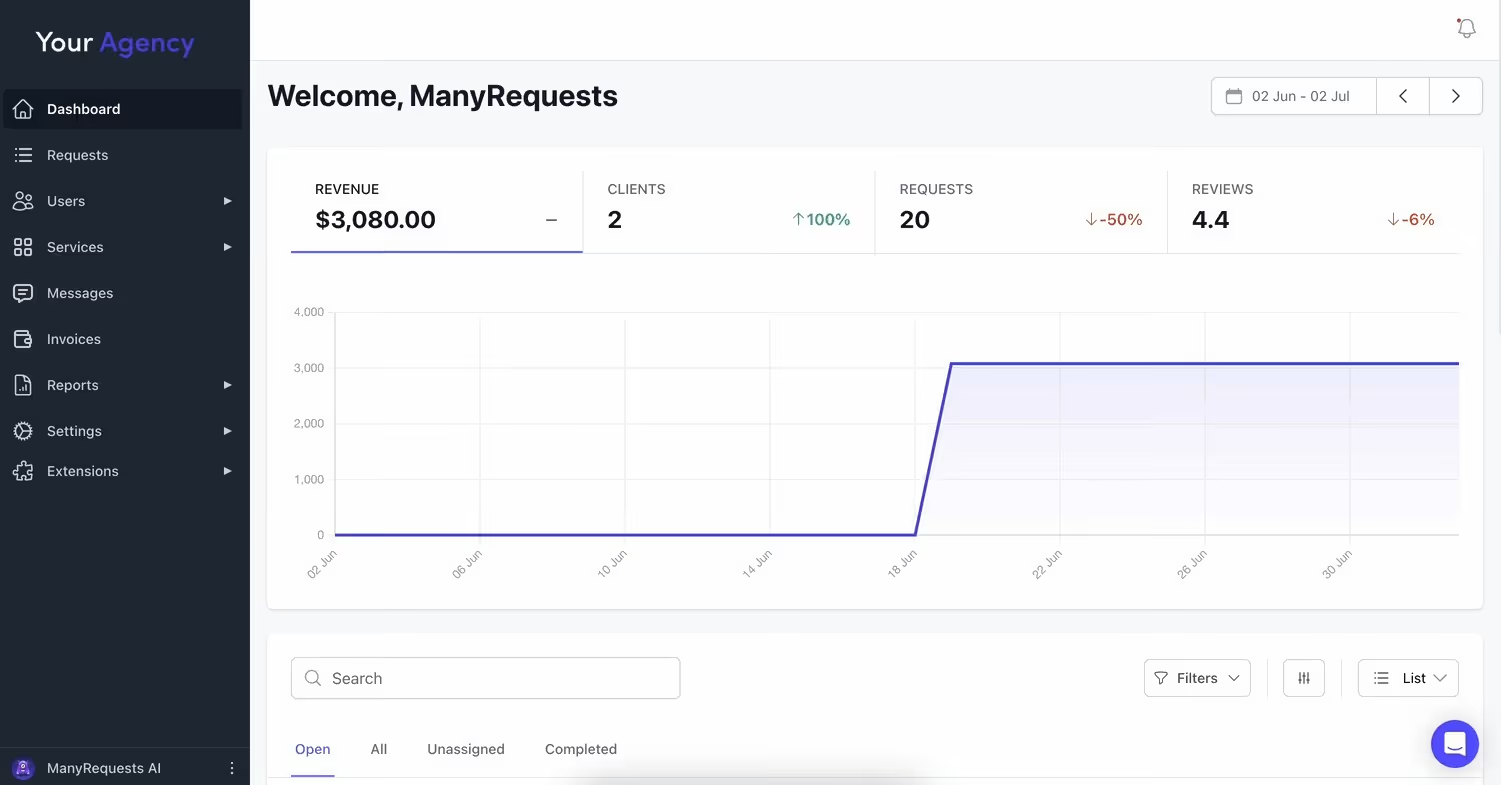
Best for: agencies (2-50 people) that need CRM, client portal, project management, and billing features in one platform.
ManyRequests isn't a CRM with project features bolted on. It's an easy-to-use operations platform that helps you sign the deal, receive briefs, assign to your team, and manage every other part of your operations.
We’re also the first zoho CRM alternatives on the list, so here’s how ManyRequests works:
1. You can send leads a link to your service catalog: Here, they can see every service you offer and the specific pricing attached to each. If it looks like this on your portal (hosted on ManyRequests):
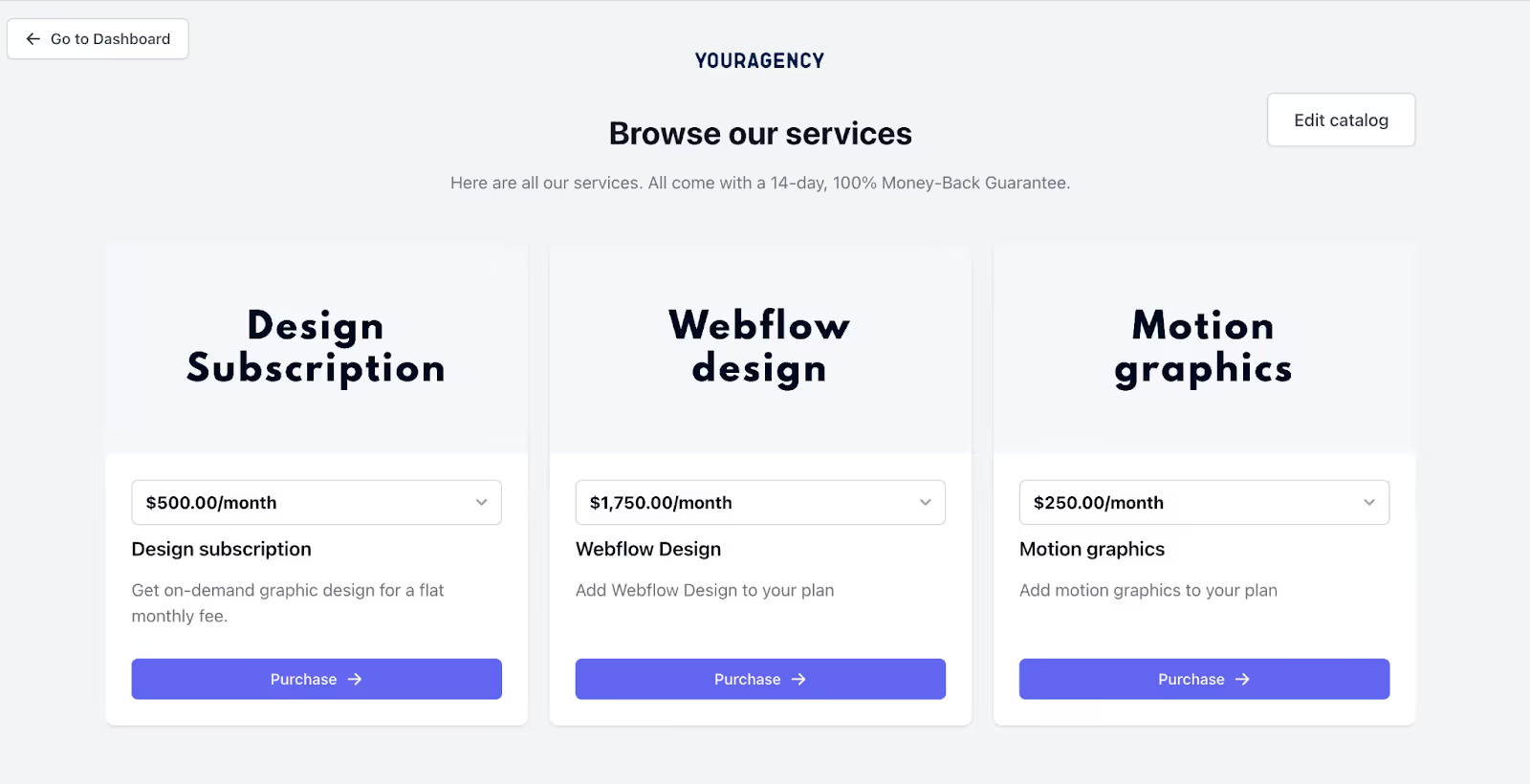
You can extract the link:
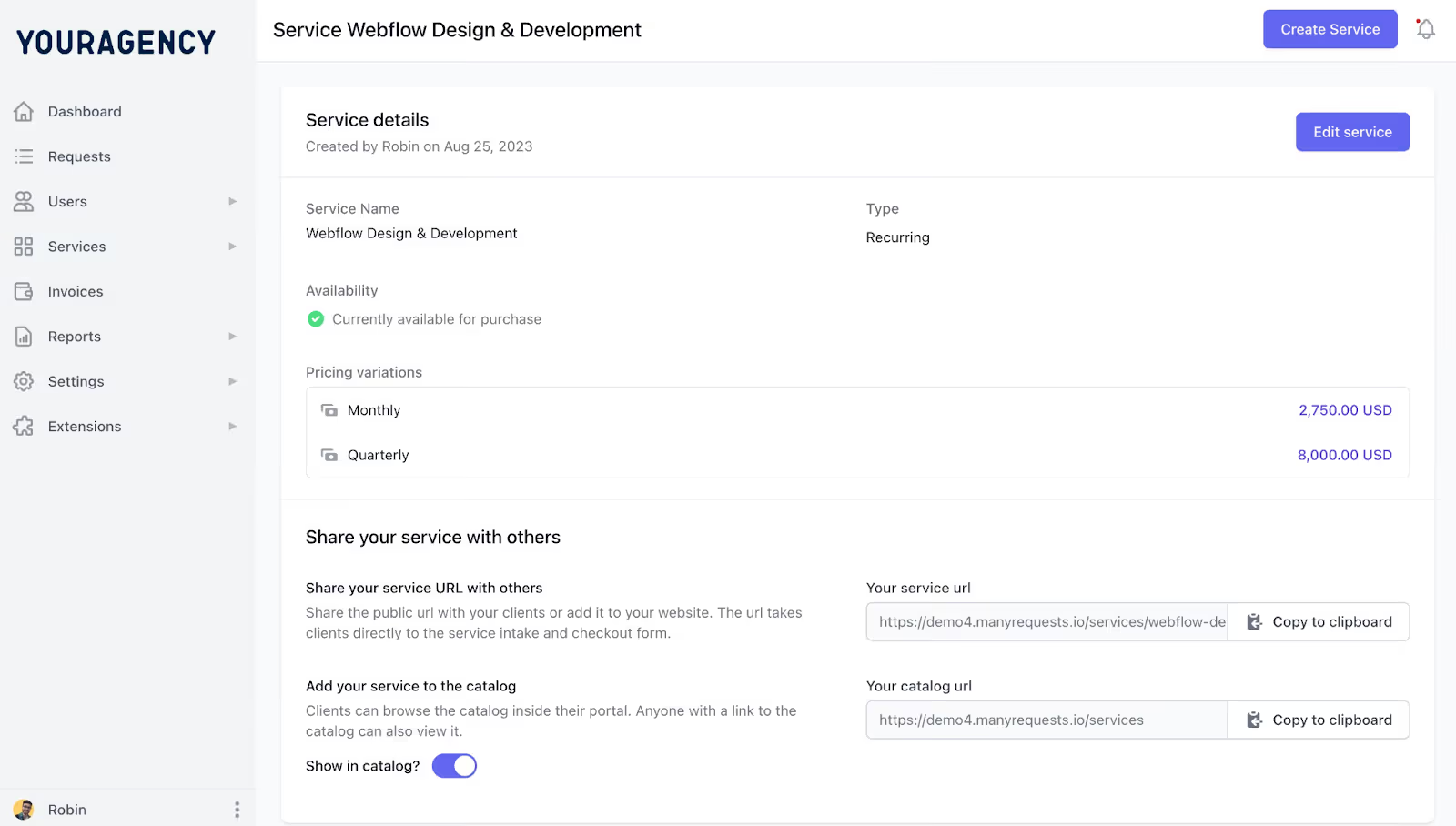
And it’ll look like this on your website; just like it is for one of our clients, Teamtown:
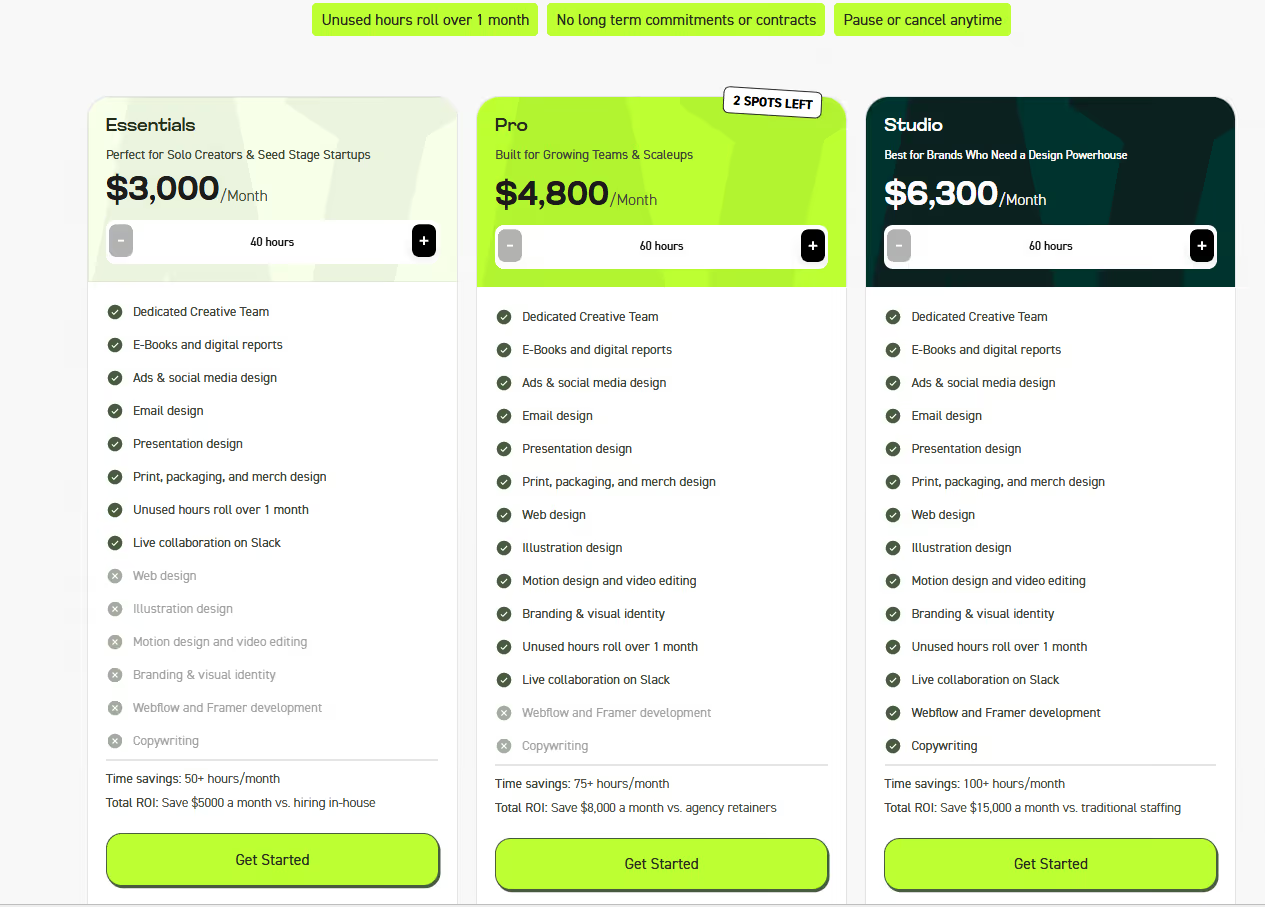
2. Onboarding feature: When they hit “Get Started”, they’re prompted to pay (which validates their contract with you). If you charge clients after the service, you can deactivate the purchase button. You can even allow them to start with a free trial. Here’s what your onboarding flow can look like:
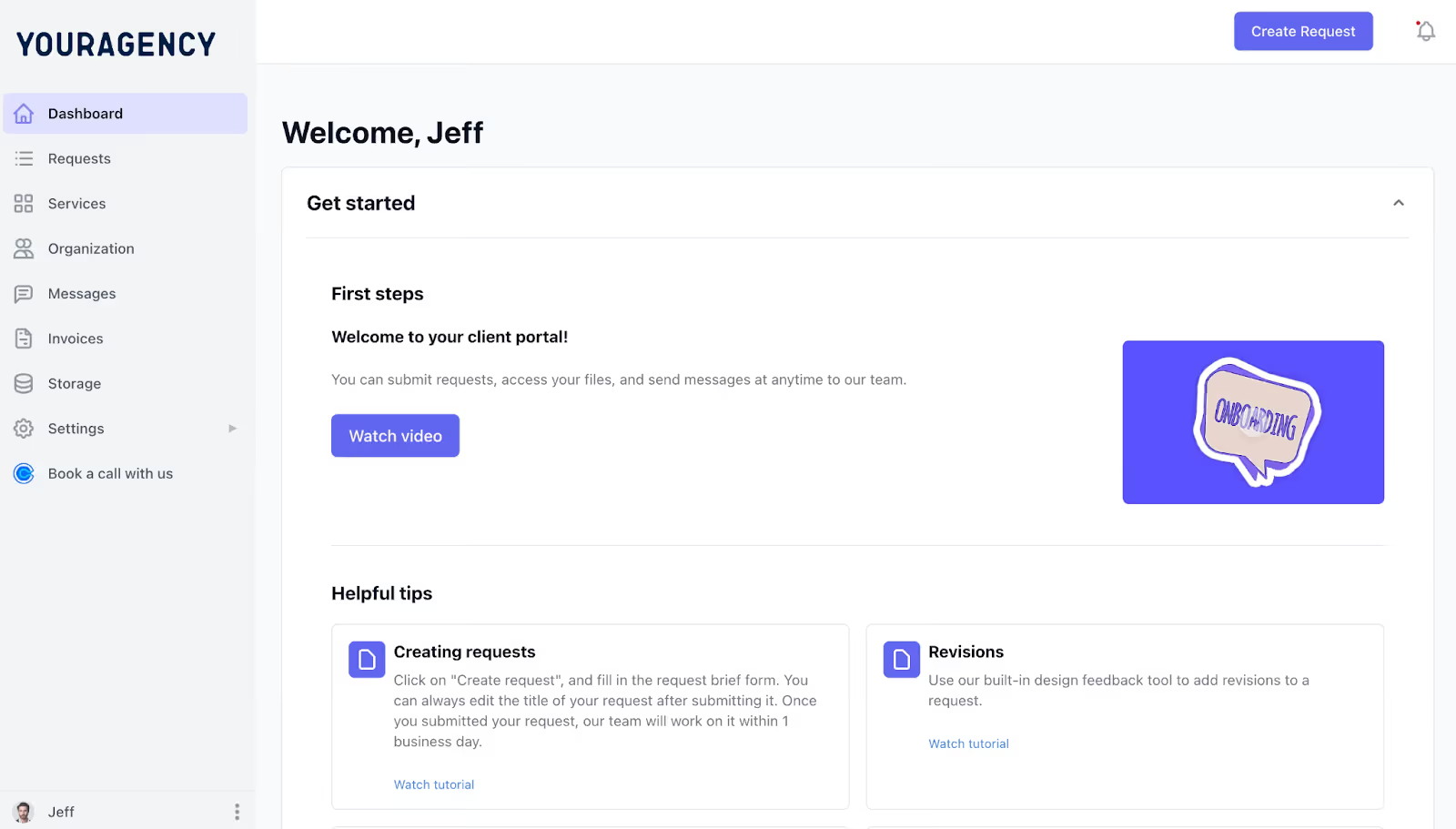
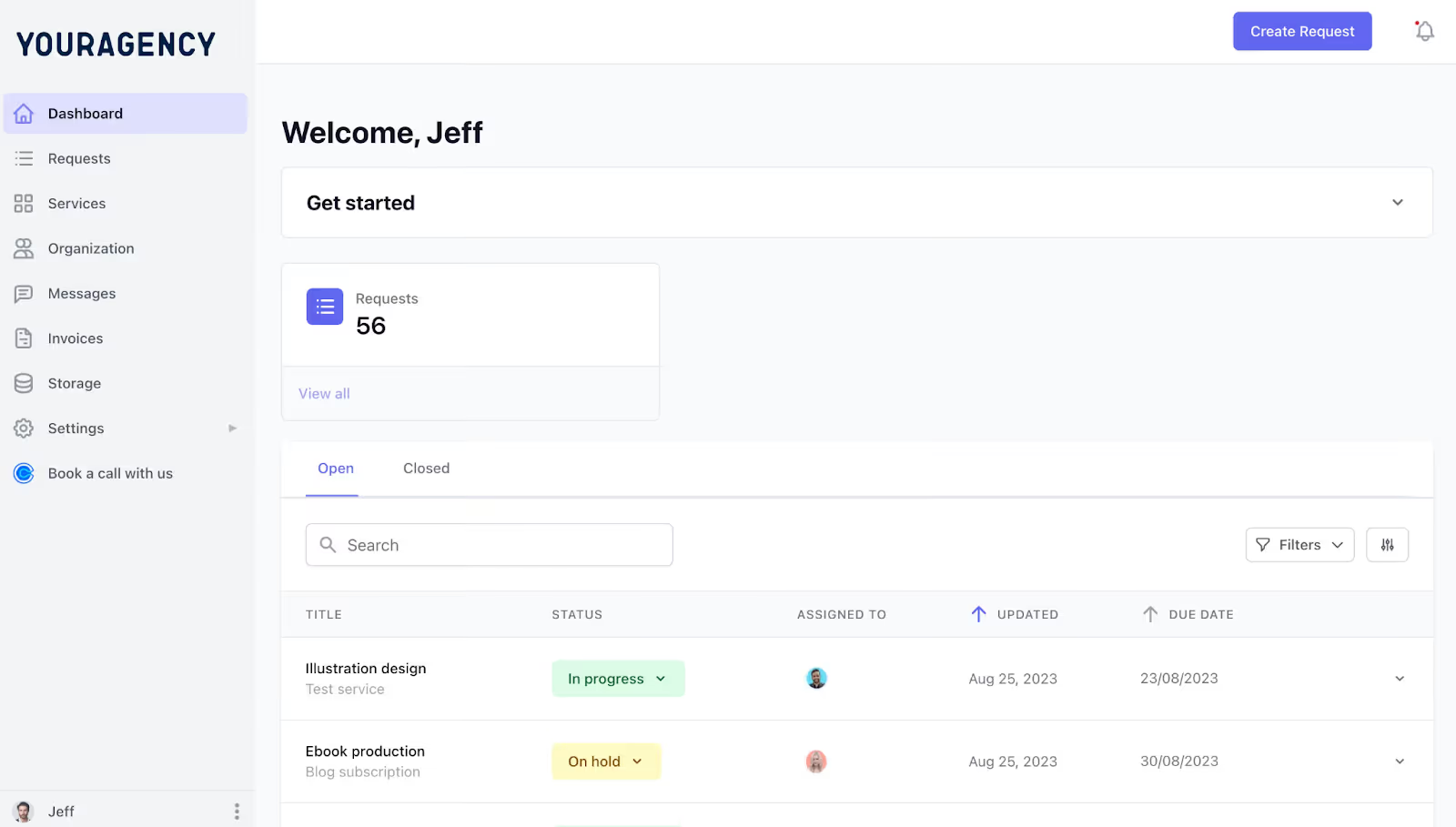
3. Clients get a client portal where they can submit new tasks directly to your agency. They can track progress on existing tasks, track hourly bill (for hourly clients) and even roll over unused hours to the next month:
4. ManyRequests automatically creates invoices for completed tasks, so you don’t get bogged down by the administrative work of writing invoices and mailing them. Clients also get automated follow-up messages if the invoice is unpaid on your due date.
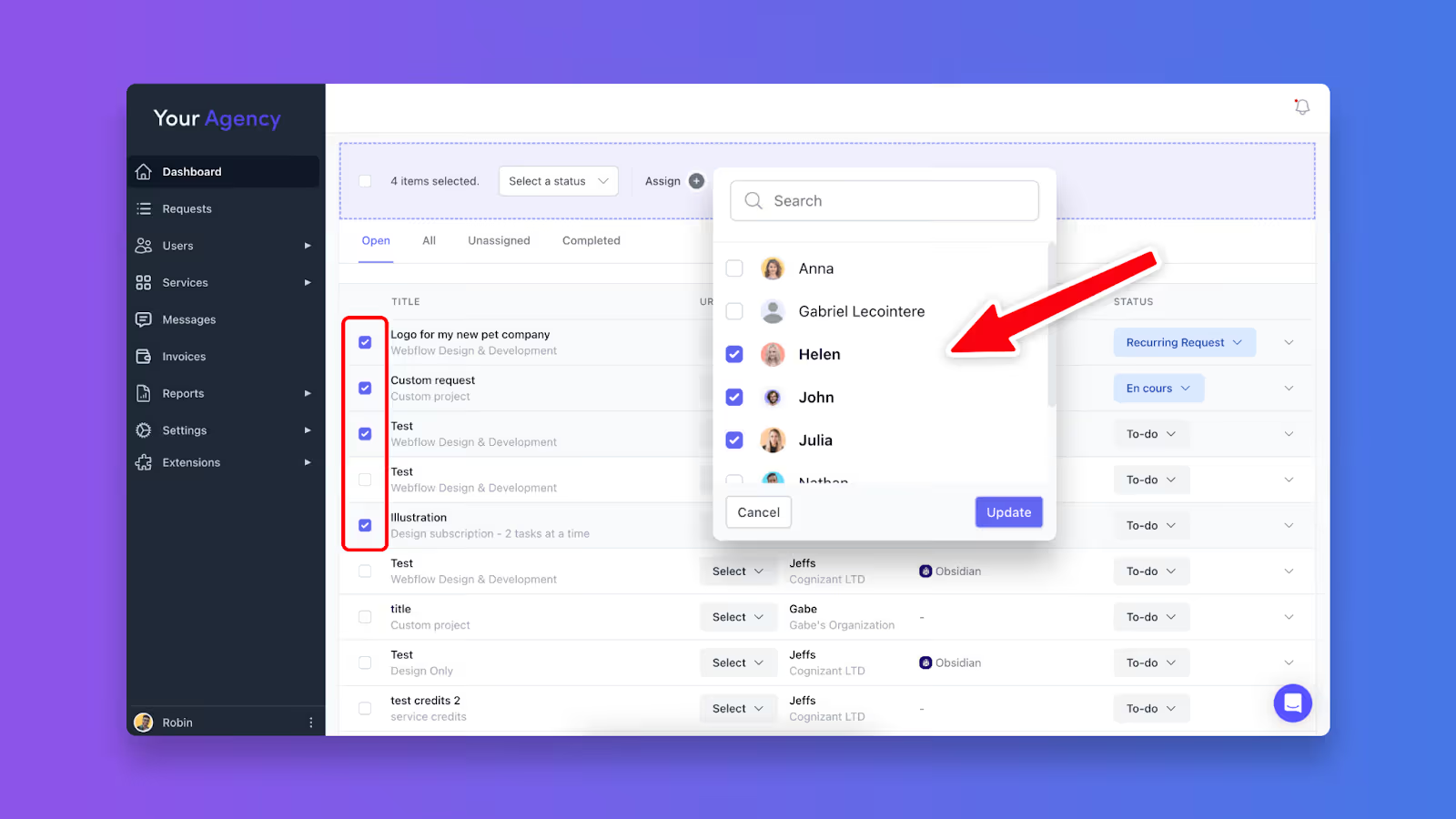
5. For the project side, you can auto assign tasks to your team or use the @ symbol, which also notifies them via email:
Your team can view their existing tasks using the Kanban or the list view – whatever works best!:
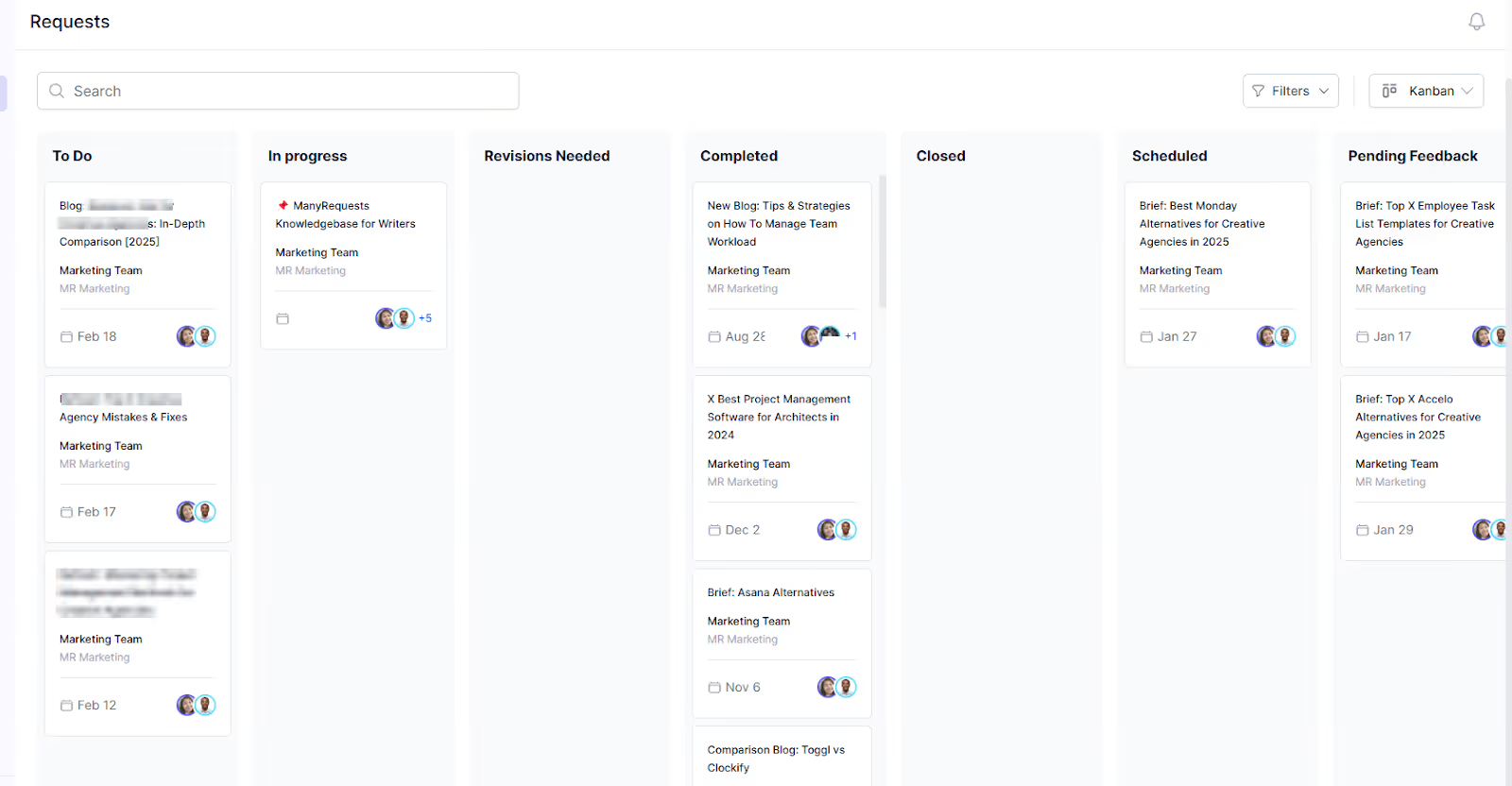
You can also use the workload view to schedule hourly tasks across your team members so everyone works the same hour to prevent burnout.
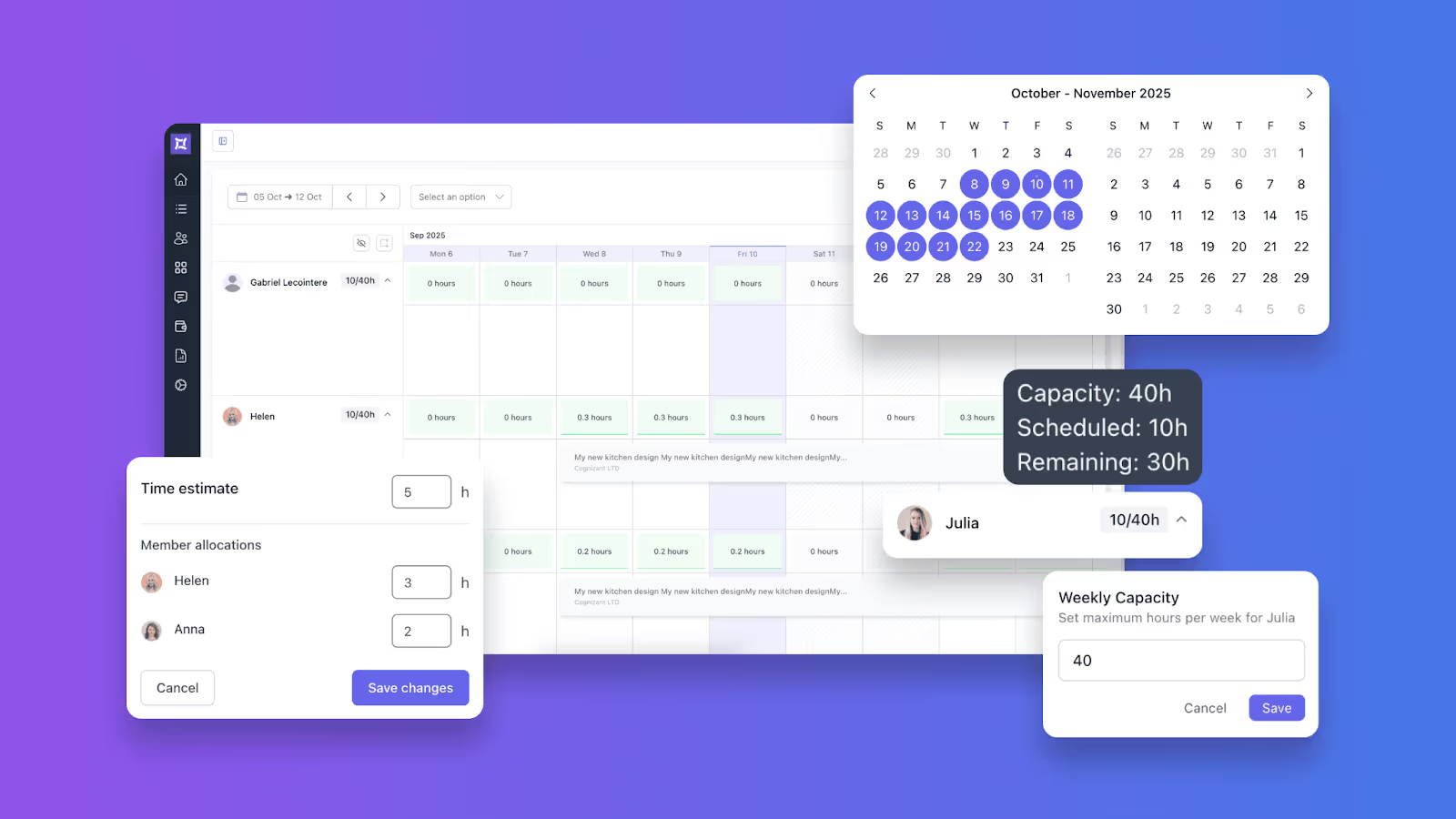
1. The Client Portal
Zoho review: “Zoho CRM Plus brings sales, marketing, customer support, and analytics together.” Zoho is a tool for sales people and sales-thingz.
For agencies, you need a client portal with your custom domain, logo and brand colors. Your clients will see active projects, submit new requests through custom forms, and track project progress. This way, they won’t have to email you for updates or have issues reconciling their invoice for hourly work.
2. Time-tracking converts hours into invoices automatically.
Your team can clock time directly on their projects without a separate subscription. It also links those hours to your billing setup, such that hourly clients get invoiced accurately. However, you can edit your invoices if you want:
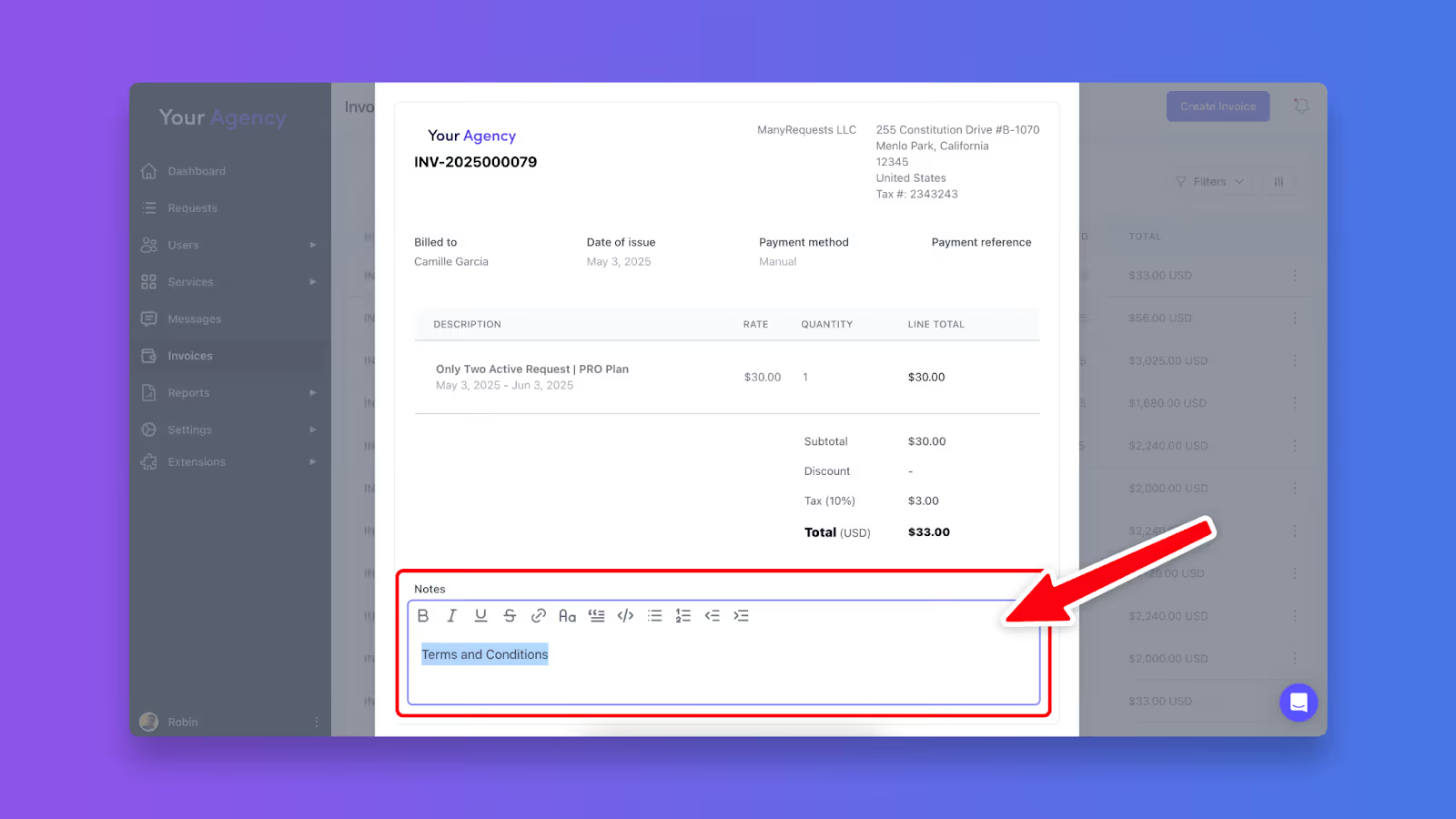
Retainer clients can also see their bill (immediately a project is marked as complete). Compared to Zoho, every project can be easily converted into an invoice, and you don’t have to write anything out.
3. Design Feedback with context, not email.
With ManyRequests, clients can annotate designs, mark up PDFs, and leave timestamped comments on videos you’ve created for them. Especially if you’re a design, video, or marketing agency. And since ManyRequests allow integrations with Figma and Adobe XD (via iFrames), they can collaborate with you via the platform:
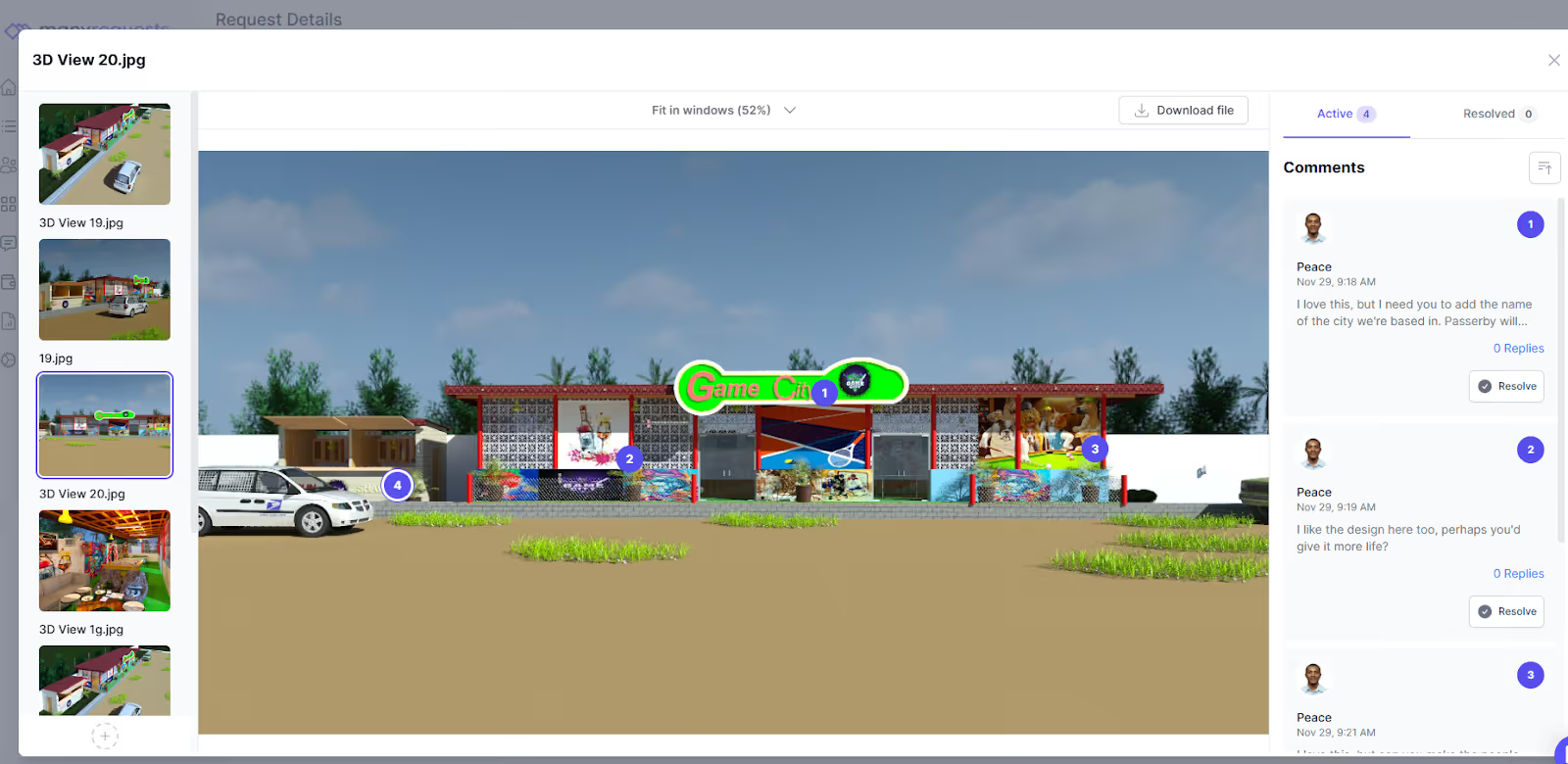
One of the things I love about being able to give this level of detailed feedback through design proofing is the version control feature. Your clients can always see the different versions of their designs and what you’ve fixed/changed based on their feedback:
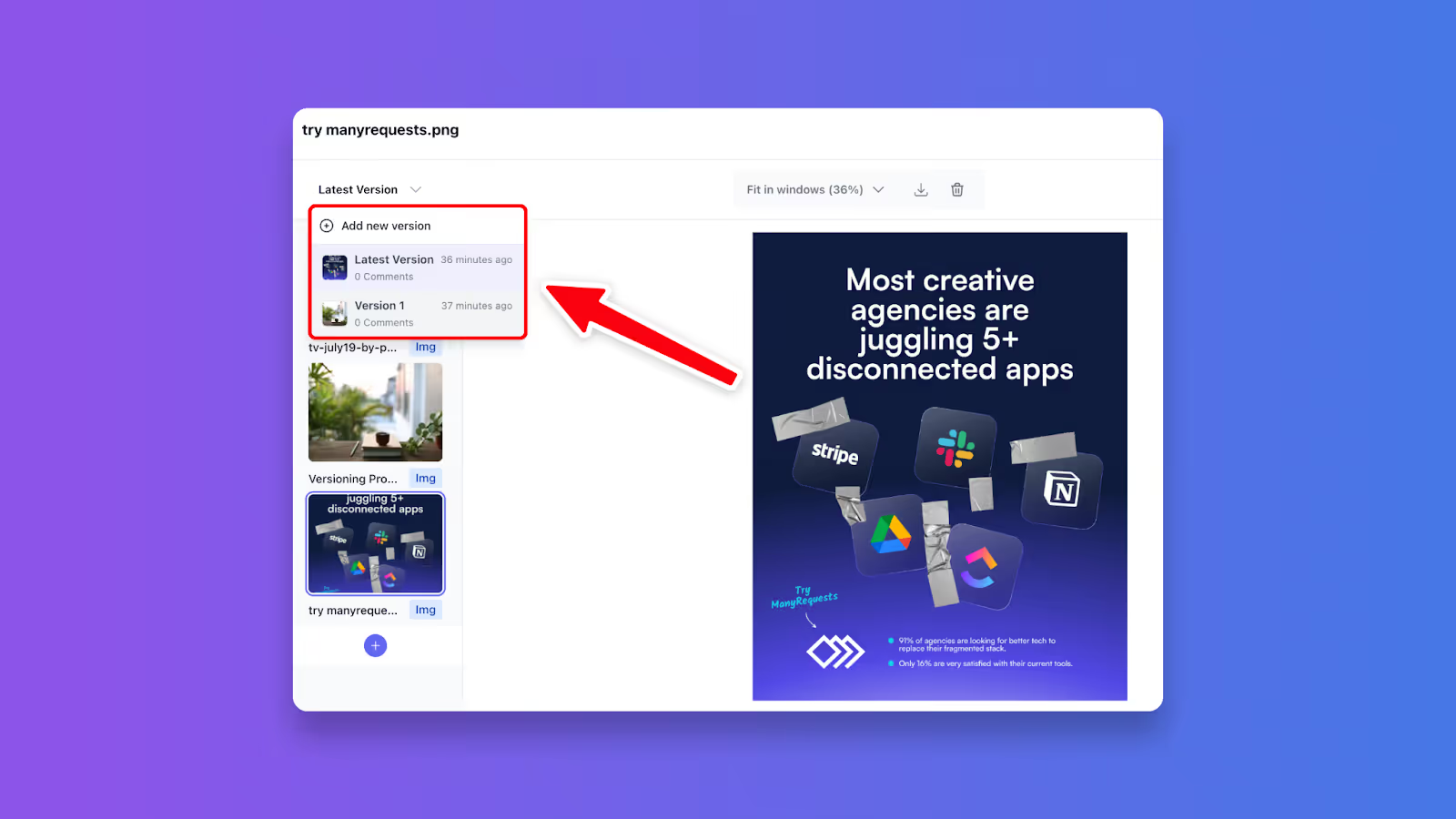
And if they have more context to give (feedback-wise) for your work, they can use the Loom integration to record a quick video:

4. Track profitability across projects
ManyRequests helps you see profit patterns agencies miss when they're stuck in spreadsheets. You can track profit levels by client, service type, and team member, and filter reports by date range or service category to answer questions like:
This helps you decide whether you need to improve your pricing, terms and conditions, or change how you manage operations.
Btw, you don't pay a cent when you invite clients into your portal.
Zoho CRM closes deals. ManyRequests delivers them with the client portal, design feedback, automated invoicing, and time tracking that Zoho requires three separate subscriptions to replicate.
Best for: 20-70 person agencies for resource management, profitability tracking, and sales pipeline in one system.
Productive combines CRM, project management, and financial tracking in one agency-focused platform.
You can track leads through the CRM pipeline, manage projects with built-in time tracking and task assignments, then compare budgeted versus actual hours to see your real profit margins (not just the revenue).
1. Resource management to prevent burnout: You can see team workload across all projects in one view. Identify who's overbooked, which projects are bleeding hours, and when you can realistically take on new client work. This is the type of capacity planning that ManyRequests and Productive does that Zoho cannot help with.
2. Profitability reporting to show which clients are worth keeping: You can track budgeted hours vs. actual hours per project. And can see your margins in real time. You can then make decisions about which services to scale and which services (or clients) to remove (or reprice).
3. Time tracking ties directly to billing: Like ManyRequests, Productive converts tracked time into invoices. Unlike Zoho CRM, it doesn't require a separate product to do it.
It's powerful, maybe too powerful for smaller agencies. The “layout is a bit overwhelming,” according to a user, and the reporting features are a bit limited. The setup can also take days, and while it has client portal features, they're not as polished or intuitive as purpose-built solutions.
However, think of Productive as the middle ground: more robust than Zoho CRM for agency operations, but more complex than ManyRequests for the project delivery workflows. This makes it one of the most friendly client management software for agencies.
Best for: Agencies that want colorful, visual project tracking and can handle client communication elsewhere.
Monday.com is one of Zoho alternatives for agencies that address one of its biggest complaints: overwhelming and cluttered interface. Where Zoho drowns you in tabs and technical jargon, Monday.com gives a clean, color-coded board that helps your team differentiate tasks at a glance.
1. Template library to accelerate new projects: Monday.com offers pre-built templates for marketing campaigns, product launches, content calendars, and client onboarding.
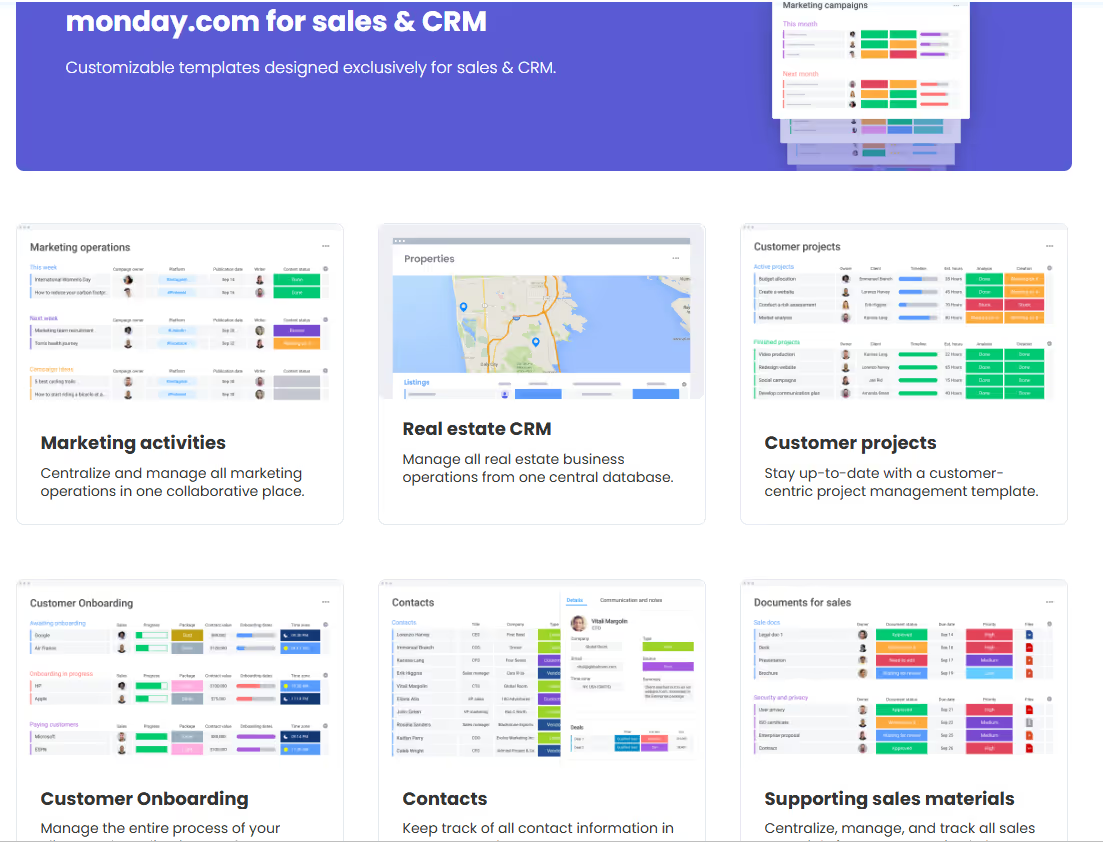
Instead of building board structures from scratch every time you start a new project, you can customize an existing template in minutes. Simply add your specific columns, adjust automation rules, and invite the team, and you can start a custom automated workflow.
This can help you manage multiple projects and clients at the same time.
2. The visual workflows can reduce cognitive load: Since Zoho CRM is clearly not ideal for agencies with clients to manage (except via Zoho Projects), Monday lets you see project progress via Kanban, timeline, Gantt, or calendar views. You can color code your projects so you can scan 10 projects and understand their progress status at a glance.
3. Automate repetitive work. You can set up triggers: when a project moves to "Complete," notify the client via email and create the invoice automatically. This helps you manage client relationships during active projects, and you can automate so much more.
Monday doesn’t have client portals, billing, and design feedback features.
So, it’s great at internal project management, but it is limited on the client-side of your operations. You'll need a separate tool for invoicing and would have to use Slack or email to communicate. However, it works – really works.
Monday.com is a good Zoho CRM alternative if you've already solved the client communication problem. If you haven't, consider ManyRequests as your agency CRM software because of its client portal.
Best for: Sales-driven agencies that close high-volume deals and need dead-simple pipeline visualization.
Where Zoho CRM tries to be an all-in-one business suite (and overwhelms users in the process), Pipedrive focuses exclusively on sales pipeline management with a cleaner interface.
1. Kanban-style pipeline to visualize deal stages: You can drag deals between stages (Lead → Qualified → Proposal → Closed) and instantly spot where deals are meeting dead-ends.
For instance, you have 12 pending proposals because they haven’t been signed by a major player or you have leads stuck in qualification for weeks. This way, you won’t have to hunt through reports to find why some deals haven’t come through.
This visual simplicity also helps sales-focused agencies move fast. Your team spends more time selling without trying to adapt to complicated CRM features.
2. Activity tracking to organize followups: You can schedule calls, emails, and meetings directly on your deal cards.
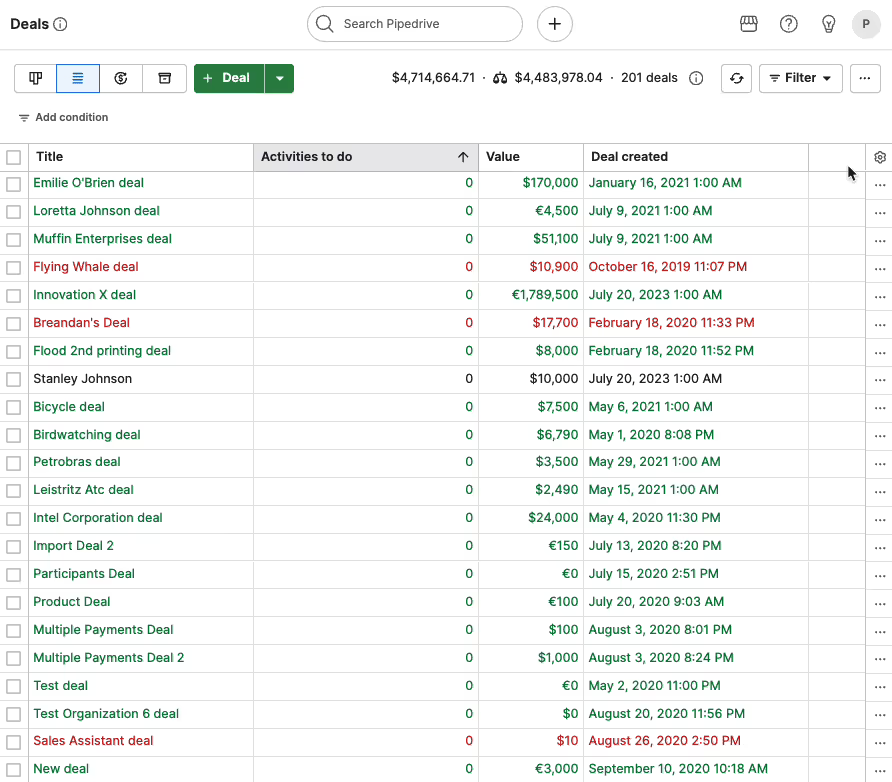
Pipedrive reminds you when it's time to follow up so don’t lose deals because someone forgot to reach back out (which is usually what happens).
3. Forecasts revenue through actual pipeline data: You can see projected revenue based on deals in each stage. And you can also adjust close probability by stages to get realistic forecasts. This helps you hire based on the health of your pipeline (to avoid over-staffing or under-staffing).
Pipedrive helps you close deals, and that’s the end. Once a client signs the deal, you'll need a separate PM tool to deliver the work. So if you’re a lead-gen agency handing clients off to partners, that's fine. But if you’re doing the actual work, you’d need another agency CRM software with a project management tool.
Best for: Agencies that need client visibility into projects without overwhelming them with internal complexity.
Teamwork is one of Zoho alternatives for agencies, and that’s because of the features I saw. It helps you manage the client side of your operations such as billable time tracking, budget management, and profitability reporting on every project.
1. Client portals with appropriate permissions: Just like in ManyRequests, you can grant clients access to project views, tasks, and files without revealing internal workflows. They see what they need to see (e.g. deliverables, timelines, status updates) not your team's internal chatters or their hourly rates.
This permission structure keeps your clients informed about project progress without being overwhelmed by private conversations.
2. Time tracking links directly to budgets and invoices: You can track time within Teamwork to see how their effects on your profits in real time. When a project approaches its budget threshold, you know immediately and can convert those hours to invoices without any integration to QuickBooks.
3. Resource management prevents capacity issues: You can see the team’s workload across all projects, and see who's overbooked to avoid burnout. You can also use this feature to decide whether you take new client work or hire freelancers to help with your workload.
4. Track project profitability to know what's working: Which clients are profitable? Which services drain resources? Teamwork highlights both so you can make informed decisions about pricing, staffing, and the type of clients to market to.
White-labeling is quite limited on Teamwork. While you can add your logo and colors, clients will still see Teamwork branding. The mobile experience is also stripped down compared to the desktop version. Factor this in with the “lags when handling large projects”, you may have functional issues while working on the go.
Best for: 20-100 employee full-service agencies that need integrated accounting, resource planning, and project management.
Function Point consolidates CRM, project management, accounting, and resource planning features into one platform. When you win a deal, it becomes a project with assigned team members, and you can track time sheets, the client’s budget (per project), and invoices (all of which are automatically synced).
This eliminates duplicate data entry when it works, but you'd have to learn how these modules work together to give you a complete architecture. And that takes a LOT of time.
1. End-to-end financial management: Track accounts payable, accounts receivable, and general ledger inside the same platform where you manage projects. You can then generate your financial statements to see agency-wide financial health alongside the profits.
2. Dual estimate system for client and internal numbers: You can create polished proposals for clients and keep (or maintain) separate internal budgets with the actual costs, markup, and projected margins per project.
Your clients will see the clean, well-drafted proposal, while your team sees the actual numbers. This helps you know when a project is crossing a specific threshold or if it’s still profitable.
3. Resource planning at scale: You can assign team members to multiple projects, monitor utilization rates in real-time, and forecast capacity gaps to avoid emergency hiring. Function Point helps you figure out if you have the bandwidth for a new client and when you need to hire, especially when you have many active clients.
4. Resource management and planning: Function Point allows users to create a central dashboard that shows every project's current stage: creative/design task in progress, tasks waiting on the client’s approval, or work stuck in production.
You can click into any project to see granular details like the designer who’s redesigning a logo, while another designer is working on social graphics (for the same client). So when the dashboard shows five deliverables queued behind one person, you can easily find the bottleneck and redistribute tasks to available team members to stick to deadlines.
Implementation on Function Point can take weeks. You'd have to configure multiple interconnected modules, migrate historical data, and train your team – a process complex enough that many agencies bring in Function Point consultants.
Bottom line: Agencies under 20 people may struggle to justify the cost and the learning curve (especially for features you may never fully use).
Zoho isn't bad software. It's just not an agency software. It tracks leads, as it should, but leaves you scrambling for separate tools to manage projects, invoice clients, and receive feedback directly via a design proofing feature.
The successful agencies have found a way to organize their operations in a clean and neat way without integrating multiple tools together. You can use ManyRequests for what you’d need three Zoho products to handle:
And with the client portal, ManyRequests gets your clients up to speed when they open their portal.
Try ManyRequests for free, no credit card required. You can set up your portal in an hour or less, and onboard your team in a snap.
Sign up for a 14-day free trial; see why agencies are making the switch.
1. See how ManyRequests works in real life. Start a free trial and experience how productized agencies centralize requests, reduce chaos, and streamline delivery, without changing their entire workflow.
2. Read our Implementation Guide to launch smoothly with your team and clients.
3. Follow us on LinkedIn and YouTube for practical agency growth strategies
4. Check out The Productize Blueprint to learn how to turn your services into a scalable, productized offer.
Peace Akinwale is a B2B SaaS content writer and strategist who creates BOFU content and how-to articles that drive measurable growth for software companies and agencies. Over six years, he's worked with clients like Marker.io, Pangea.ai, Spicy Margarita agency, and HigherVisibility to turn technical topics into content that converts, and has helped a client achieve 233% organic traffic growth within six months of taking over their blog.

