Free Software Development Scope of Work Template [Docs / DOCX]
Technical failures can happen in software development, but if your client approved a feature list three months ago, and they're currently upset it doesn't have a feature that was never in the original spec, then you have a documentation failure.
In this guide, I'll show you why you need a scope of work statement, and what should be in your document to avoid situations like this with clients. We’ll also share a template that you can edit for your clients.
What is a Software Development Scope of Work?
A scope of work is a technical contract that defines what you're building, how you're building it, and when the project is complete.
It documents every feature with enough detail that both you and your client understand what every term used for the project means. It helps you separate one-time development work from ongoing services you may offer, like hosting, maintenance, and support. It also establishes how bugs are handled versus feature requests, and what triggers additional billing.
Reasons Why You Need A Scope of Work Document
Software projects are easily susceptible to slow and unprofitable work if you don't clearly draw your boundaries beforehand. Let's see how that can happen:
1. It helps you avoid feature creep.
Feature creep is when your client asks for extra features to the software than what was initially agreed on without additional pay.
Asking for extra features isn't bad.
Feature ideas come as you work on the software. What's wrong is if they expect you to work on these extra requests for free.
For instance, let's say your client asks for a date flier for the user list. They want their users to click a dropdown and select a date range.
They believe it's simple, but building those filters will require work throughout your entire application.
It takes time. Your scope of work prevents this by listing every feature with its technical specification. Rather than write user management only, write everything that will happen under User management, for example:
- User registration with email verification,
- Password reset via email token,
- Role-based access control with admin and user roles,
- Profile editing for name, email, and avatar.
This lets them see the technicalities behind each feature requests that has been discussed, and if they have extra requests, you can bill them separately for that.
2. No agreement on when the software’s end product is like.
Your client paid for your services, but they don't necessarily know what goes on in the background, so they create their own assumption of what a feature is, and what it entails, and you end up in situations like this:
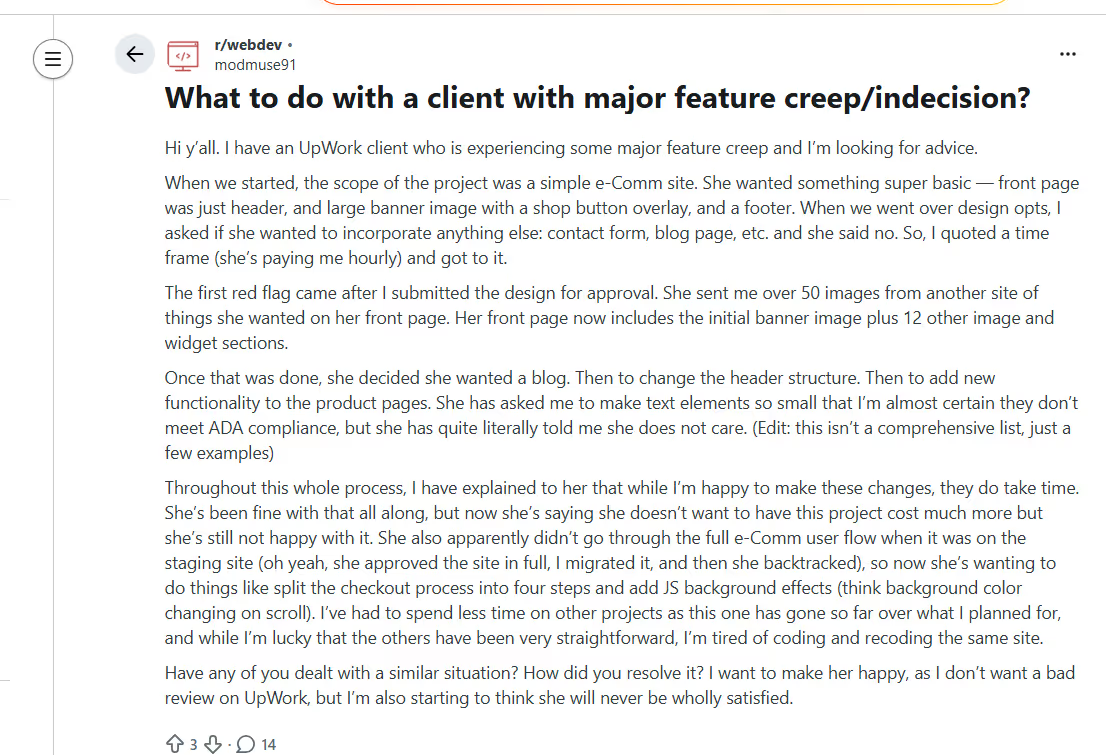
This Reddit user now has to deal with a client who's not sure of what they wanted and piles new features and changes on the developer mid-project.
That happened because they didn't document technical details beforehand.
Your client probably has an assumption on what the app will look like before the project even starts, but the problem is that their specification may not match that assumption.
Your scope of work solves this by including acceptance criteria for every feature. For instance, for payment processing, you may document that:
- Users can process one-time credit card charges through Stripe.
- The system handles success and failure states with clear user feedback.
- Customers receive receipt emails after successful payments.
- This does NOT include saved payment methods, subscription billing, or refund processing.
When you deliver exactly what's documented, clients can't claim that you didn't include all the features you discussed.
3. Clients can blur the lines between development and ongoing services.
Let's look at this scenario:
Your client receives your development quote and signs the contract.
You build and deliver the application, but they still expect you to offer ongoing maintenance service that wasn't agreed on initially.
This happens because software development can blur into software operations. If you don't set your boundaries early, your clients will see the ongoing work as part of the original service they purchased.
Your scope of work separates one-time work from recurring services. It also documents what the project does not include.
4. Clients can disguise unpaid work as bug requests.
Some clients may disguise new feature requests as bug fixes. They’ll say the dashboard is confusing when they actually want a new layout.
Your scope of work defines what qualifies as a bug, which are features documented in the scope that don't work as specified, like application crashes or unhandled errors, or security vulnerabilities.
You can also define the warranty period in the document. For example, if you’ll only offer thirty days of bug fixes after launch, state it.
Creating Your Software Development Scope of Work
You can build your scope of work with these nine components:
1. Start with Project Overview and Technical Stack
Start by stating why the software is being built and what problem it is intended to solve. This anchors every technical decision that follows.
This section should briefly outline:
- The business problem or opportunity
- The intended users of the system
- The high-level outcomes the client expects (e.g. automation, scalability, efficiency).
Don't talk about the features in this section. It's about the project’s intent, over its implementation.
2. Describe the Functional Requirements
Once the purpose is clear, define what the software will do from a user and system perspective. This includes the core functionality that you need to meet the stated objectives, like the:
- Core user actions (e.g. register, log in, submit data, generate reports).
- Key workflows or end-to-end processes.
- System responses to common user interactions.
- Basic rules or logic that govern how the system behaves.
You should write these requirements out in a clear, non-technical language, so your client understands them.
3. Define Non-Functional and Technical Requirements
You should also clarify how the software is expected to perform and operate.
This includes:
- Platform targets (web, mobile, desktop, cloud-based)
- Supported browsers, devices, or operating systems
- Performance expectations (e.g. response times, concurrency limits)
- Security requirements (authentication, access control, data protection)
- Regulatory or compliance considerations, where applicable
- Approved or excluded technologies, frameworks, or third-party services
There's little to no room for assumptions when you’ve made everything clear about performance, scalability, or security.
4. Specify Deliverables
Clearly identify what you will deliver to the client during and after the project comes to an end. You should do this for every feature you’ll deliver, so the client knows what to expect and you can focus on doing your real work.
For instance, the deliverables for User Authentication can be:
- Users successfully register and receive verification emails.
- Password reset emails deliver within 5 minutes.
- Sessions persist across browser restarts for 30 days.
- Admins can view all users and change roles.
- Invalid login attempts show clear error messages.
Pro Tip: Define your deliverables clearly. Add the format, timing, and dependency to avoid any ambiguities.
5. Outline the Project Timeline and Milestones
Break your development process into phases with clear deliverables. Let the client know what they’ll get from every phase of the project.
For example, add that:
Phase 1: Foundation will take the first 1-2 weeks, including:
- Database schema finalized
- Authentication system complete
- Basic UI framework implemented
- Deliverable: Working login/registration
Phase 2: Core Features (Weeks 3-5)
- Task management fully functional
- Team collaboration features complete
- Basic reporting implemented
- Deliverable: MVP with core functionality
Phase 3: Polish & Testing (Week 6)
- Bug fixes and edge case handling
- Performance optimization
- Cross-browser testing
- Deliverable: Production-ready application
Phase 4: Deployment (Week 7)
- Production deployment
- Data migration (if applicable)
- User acceptance testing
- Deliverable: Live application with monitoring
6. Establish Acceptance Criteria
For each major deliverable, include how it will be reviewed and approved. Acceptance criteria provide an objective basis for determining whether the work has been completed satisfactorily.
So structure your acceptance criteria to address:
- Functional correctness of the software.
- Alignment with agreed requirements.
- Absence of critical defects
- Successful deployment or handover, where applicable
7. Hosting, Maintenance, and Support Boundaries
This section protects you from accidentally signing up to run the client’s software forever. It helps you treat development as the work required to build, launch, and stabilize the application, and nothing more.
Make a list of what's included in the development and what’s not. The moment the app is live, anything that involves recurring effort, recurring cost, or ongoing responsibility needs to sit outside the core scope.
Be explicit about this boundary because clients can naturally assume you’ll handle hosting and updates for them after the app goes live.
8. Change Request Process
This section will help you slow things down on purpose. Clients will ask for changes mid-build (which is normal), but you need a process that forces those requests to be deliberate, priced, and approved.
Make every change start with a written request so you can assess the impact before touching the code.
For example, if you use ManyRequests, clients can submit change requests through the request feature instead of mentioning ideas in calls, emails, or chats.
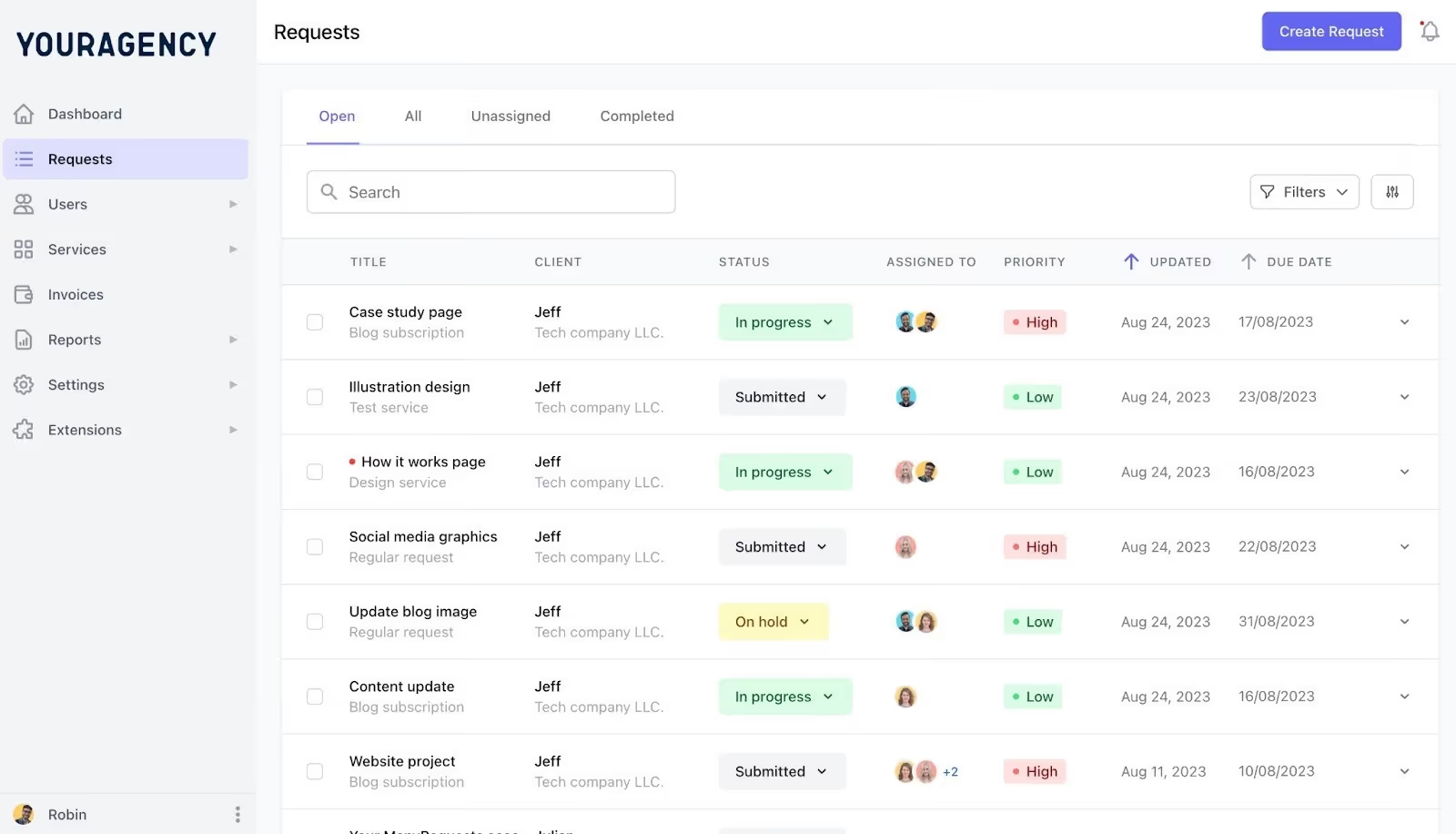
ManyRequests gives you a single platform to review every request the client sends in, estimate time and cost, and decide whether it fits the current phase. Once a request is submitted, you can respond with a clear estimate and create tasks from that single request.
Your terms should be clear in your scope of work. For example:
Requesting Changes:
- Client submits a written change request describing the desired functionality
- The developer provides a time and cost estimate within 2 business days
- Client approves the estimate in writing before work begins
- Timeline adjusts based on change complexity
You should also discuss the pricing.
Change Request Pricing:
- Minor changes (< 4 hours): $150/hour
- Major changes (4+ hours): Separate fixed-price quote
- Changes requiring architecture modifications: Full scope review and re-quote.
Pro Tip: Wait for explicit approval from the client, after you estimate time and cost, before you start work.
9. Bug Definition and Warranty Period
When writing your scope, define what you’ll fix for free, or what would cost extra. A bug means the software does not behave the way the scope says it should, but if your client decides to change their mind on a feature, then that's not a bug, and they can pay for that.
Set a short, defined warranty window and stick to it. You should also fix real defects during that period, then switch to billable work once it ends. This tells your clients to respect the boundary between fixing mistakes and adding new ideas.
How To Use Our Software Development Scope Statement Template
Here's how to customize our free software development scope statement template to fit your agency's needs:
- Download the template from our website.
- Edit the text to add your business name and logo.
- Fill in all highlighted spaces and italicized words with your information
- Add the specific services you'll offer your client
- Review it with your team members
Conclusion
Scope of work document protects you from an endless feature creep that could stretch the project more than agreed on. If you don't set your boundaries right with your client, they’ll pile on extra works until you lose track of what you discussed in the beginning.
This document is a reference point so you can avoid this. You can also further improve your project boundaries with ManyRequests. With our platform, you can bill for extra work, take client's requests, manage your team and the task, and sell your productized services, without leaving the platform. If this interests you, we offer a 14 days free trial to show you how it works.

.svg)