Free Video Production Proposal Template [Docs / DOCX]
The challenge of creating videos is convincing people to invest in them. A video production proposal template helps you put everything—your plans, costs, and timeline into one simple document that makes clients want to hire you.
Clients want proof you're both creative and reliable. I'll give you a free template and show you what to include, how to set your prices, and how to explain video production in a way that anyone can understand.
What is a video production proposal?
It is a detailed plan that presents your creative idea, explains your process, and shows that you understand the client's needs. You're likely to win 45-70% of projects with a good proposal that clearly defines what's included, how many changes are acceptable, and how everything works from planning to delivery. Having a centralized system where clients can review edits and communicate with your team makes executing on these promises much easier.
Your proposal helps keep projects on track and prevents clients from demanding work that wasn't in the proposal. But what exactly goes into a proposal that clients actually want to sign? Let's break down each essential piece.
Must-have parts of a winning video production proposal template
Every strong proposal follows a natural flow, starting with the client's needs, then your creative solution, and finally the practical details of how you'll deliver. Here's how each piece builds on the last.
1. Project goals and what you're trying to do
This part proves you listened and gets everyone on the same page about the "why." Say back what the client told you about their goals and problems—like getting more people to know their brand, showing off their product, or getting new customers.
Write down how you'll measure success - views, watch time, sales, and sign-ups. This way, you can later show how your creative choices helped them reach real results. You're explaining the "why" before jumping into the "what."
Once you've proven you understand their goals, the next natural step is to show how you'll achieve those goals through your creative approach.
2. Your creative idea and vision
This is where you sell the idea, not just the video file. Show a summary that explains the story, mood, format, and big moments. Back it up with mood boards, example videos, or style pictures.
Connect your idea directly back to what the client wants. For example, explain how customer stories build trust or why short vertical videos work better on social media. This mixes your artistic vision with smart messaging that makes business sense.
With your creative vision established, clients need to know exactly what they're getting for their money. That's where the scope of work comes in.
3. What work you'll do and what they'll get
This is where you stop extra work requests before they start. List exactly what they'll get, e.g., "1 main 60-second video, 3 short 15-second social media clips, thumbnail images, and raw video files."
What formats, sizes, and platforms are these for? Clarify what's included versus what costs extra, such as more versions, subtitles in other languages, behind-the-scenes clips, and photos. Being specific now prevents arguments later.
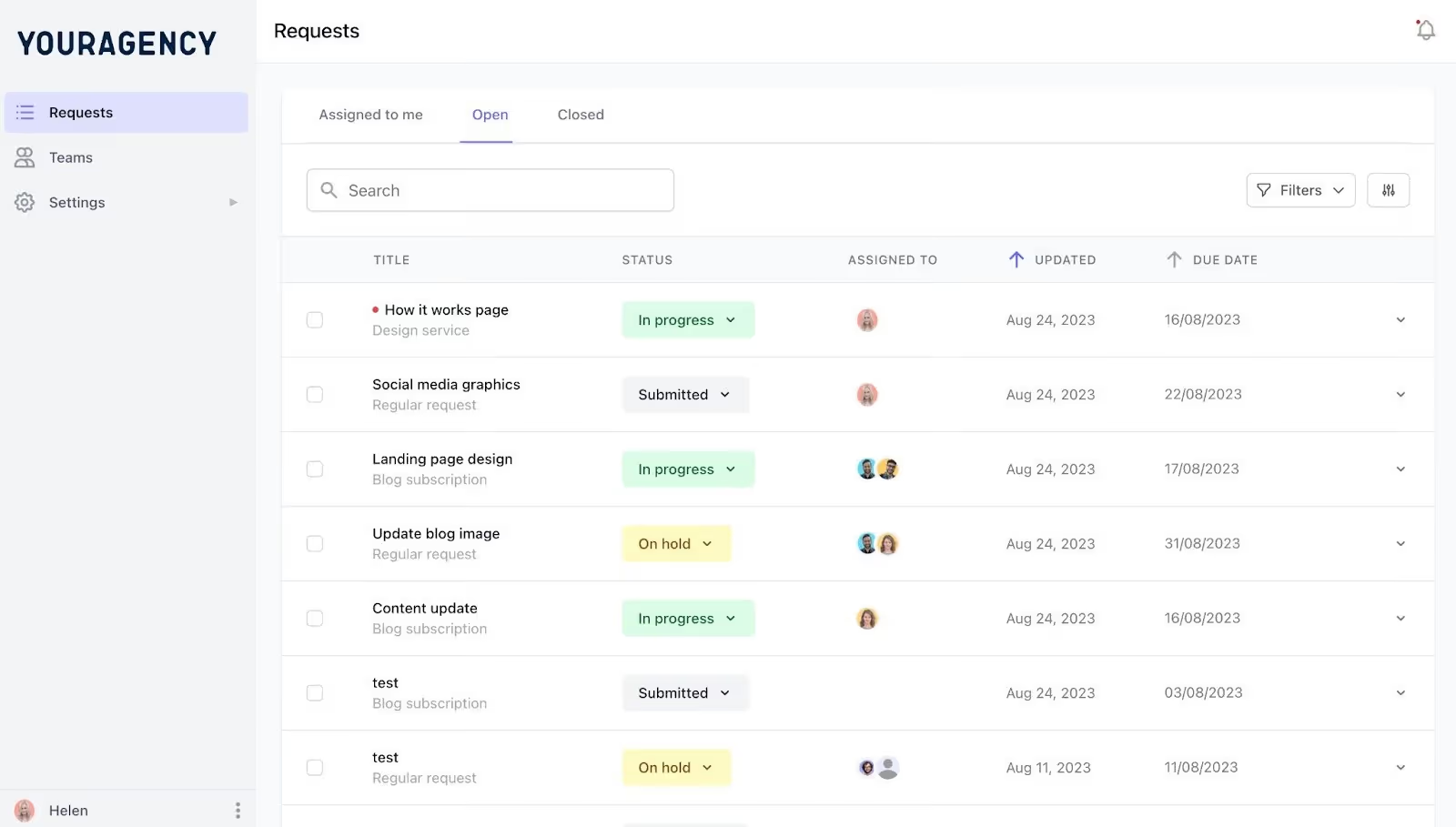
A centralized dashboard helps you track all client requests, deliverables, and their status throughout the project, ensuring clear communication about what's being worked on.
Clients need to know what they'll receive and when. The timeline section answers that question.
4. Timeline and project steps
Describe each step of the project timeline. Split it into planning, filming, and editing, with checkpoints where the client reviews or approves your work at each stage.
Add realistic extra time for changes and factors you rely on, such as when actors are available or obtaining permission to film at locations. You can show this later as a simple timeline chart that shows clients exactly when things happen.
A solid timeline only works if you have the right people and equipment to execute it. That's what you'll explain next.
5. Your team, equipment, and what you'll use
This part shows you can do the job without boring people with tech details. Introduce the key team members—producer, director, camera person, editor, graphics designer—and mention their relevant past works.
Talk about special equipment or skills like drones, stabilizers, multiple cameras, or motion graphics, but only explain how they help solve this client's specific needs and improve quality.
Now that clients see you have the talent and tools, they need to know what it all costs. The budget section removes any surprises about price.
6. Price breakdown
A clear price list builds trust and stops clients from being shocked by costs. Use detailed pricing when you need to be transparent. Separate costs for planning, filming days, equipment, actors, editing, and changes. Use package pricing when selling bundles, like a "Launch Campaign Video Package."
Common budget parts cover ideas and scripts, film crew, equipment, locations, actors, editing, animation or graphics, music and licenses, and backup funds for unexpected issues. Turn this into a clean table in your template so clients see where their money goes.
Beyond the numbers, clients need to understand the rules that protect both of you throughout the project. That's where terms and conditions come in.
7. Rules, conditions, and how changes work
This part protects both you and the client by explaining your payment plan.
For example, 50% deposit, 25% after filming, and 25% upon completion.
Define the distinction between minor edits and major changes, and specify the number of rounds of revisions that are included. Clarify how additional changes impact the budget and schedule so clients can manage their team's requests.
Specify where and how long the client can use the video, ensuring these terms align with your agreements for actors, music, and stock footage. Include the costs for expanded usage and always account for music licensing fees to avoid expensive legal issues.
Add your cancellation rules so everyone knows what to expect upfront.
With all the details laid out, there's just one thing left, making it easy for the client to say yes.
8. What happens next
End with a clear path to "yes." Define how they approve it, such as e-signature, purchase order, or signed agreement, and provide them with a deadline tied to your filming schedule or their launch dates.
Explain what happens after they sign so clients feel confident moving forward.
Now that you know what goes into a proposal, let's tackle one of the trickiest parts: figuring out what to charge.
How to figure out your video production pricing
When creating videos for clients, you have to set your prices. Your pricing affects whether clients hire you and whether you earn a profit. Here are three ways to establish your price.
Three pricing methods
- Per-project pricing means one fixed price for the entire video. This works when you know exactly what you're creating, like a commercial. Clients appreciate knowing the total cost upfront.
For example, a 60-second product video might cost $5,000, covering everything from planning to final delivery.
- Day-rate pricing involves charging for each day of labor. This suits projects with unclear scope, like ongoing social media videos. You might charge $1,500 per filming day plus $800 per editing day. This protects you when plans might change and ensures clients only pay for actual work time.
- Tiered packages offer clients basic, standard, and premium options to select.
For instance, a "Basic Package" costs $3,000 for one 30-second video, a "Standard Package" costs $7,500 for three videos with graphics, and a "Premium Package" costs $15,000 for a full campaign. This approach makes decisions easier and often encourages clients to spend more.
Once you've chosen your pricing method, you need to break down exactly where that money goes. That's the purpose of your video project scope template.
What goes into your video project scope template
Breaking costs into clear parts helps clients understand what they're paying for and builds trust.
- Pre-production (10-30%) covers planning like scripts, locations, and permits. For a $10,000 project, budget $2,000-$3,000.
- Production (40-60%) includes the filming day, crew, equipment, actors, and travel. This is your biggest expense. Budget $4,000-$6,000 for a $10,000 project.
- Post-production (20-35%) includes editing, graphics, color correction, and music. Budget $2,000-$3,500 for a $10,000 project.
Always add 10% extra for unexpected costs. List extras separately, like captions, platform versions, or rush fees, so clients understand quality work requires resources.
Even with a solid budget breakdown, many video producers still lose money because of common pricing mistakes. Here's what to avoid.
Pricing mistakes that lose you money
- Don't underprice to win jobs. When you charge too little, clients question your quality, and you can't cover costs. If your expenses are $3,000 but you charge $2,500, you lose $500 and your time.
- Always list every possible cost upfront. Include rush fees, extra crew, travel, parking, or overtime in your proposal. Surprise costs anger clients, and they may refuse to pay. It's better to list unnecessary costs than surprise them later.
- Don't forget production day logistics such as crew meals, equipment insurance, van rentals, parking permits, or generators. These add $200-$500 per filming day. Build these into your budget to avoid losing money on shoot day.
Best practices for video production proposals
Top agencies set clear expectations and prove results in proposals, helping you stand out among competitors.
Strategy before specs
Begin by explaining the business problem and your creative solution rather than technical details. Focus on expected results, such as "clarify your product story" or "increase demo sign-ups" to keep decision-makers engaged. Describe what success looks like after launch, then save equipment lists for later sections.
Use pictures and make it easy to scan
Design your proposal as a visual experience with images, mockups, and simple diagrams. Break content into organized sections with clear headings and white space to help busy clients skim efficiently. For major projects, design a PDF that shows your production quality through a professional layout.
Make it personal
Avoid sending identical proposals by using the client's exact words from discovery calls. Include case studies that match their industry or video type to show relevant experience. Replace generic template phrases with specific statements that address each client's unique needs.
Add real customer stories.
Include relevant testimonials that mention your process, communication, or measurable results to build credibility. Add production photos that match the project's scale and style to give a preview of what working with you looks like. Place awards in an "About" section where they build trust without overshadowing the client's story.
But what actually happens on the day you film? Let's fix that gap.
Shoot day logistics: What to include in your proposal
Many proposals overlook filming day details, which can create problems later. Addressing these details upfront prevents surprises and demonstrates thorough planning.
Schedule and call times
Include your expected shoot schedule showing when the crew arrives, filming starts and ends, scene durations, and wrap time. For example, "Crew call time 7:00 AM, filming 8:00 AM - 6:00 PM, with one-hour lunch break" helps clients plan and understand how long their team or location will be needed.
Location requirements
List what you need from the location, including power outlets, parking for equipment vans, load-in access, wifi for reviewing footage, and staging areas. If the client must arrange anything like security access or turning off overhead music, state that clearly in the proposal.
Client presence
Explain when and why the client should be on set to balance decision-making with production efficiency. For example, "We recommend having one decision-maker available during setup (9:00-10:00 AM) and playback review (4:00-5:00 PM) to approve shots" prevents too many people from giving conflicting directions or nobody available for critical approvals.
Contingency plans
Address backup scenarios like weather dates for outdoor shoots, overtime rates if filming runs long, and cancellation procedures.
For example, "Rain date scheduled for [date] with no additional charges, but rescheduling beyond one week incurs additional crew costs of $X" prepares everyone for unexpected situations.
Including these details prevents surprise costs, keeps everyone safe, and shows you've thought through the practical side of production—not just the creative parts. With all these pieces in place, you're ready to turn your proposal into reality.
Conclusion
Once a client approves your proposal, transform it into a clear action plan with specific tasks and deadlines for planning, filming, and editing stages. Assign one project manager to keep everyone organized and communication flowing smoothly.
Common challenges like scattered feedback, confusion about revisions, lost files, and timeline delays can derail projects quickly. ManyRequests eliminates these issues by providing a branded client portal where clients can submit requests, review video edits, communicate with your team, and manage payments—all in one place. As Ben Poss from EditCrew puts it, "ManyRequests is the entire backbone of our video editing agency. We manage clients, projects, and billing all in one place."
By establishing clear expectations and building trust, a well-crafted proposal leads to happy clients and lucrative work. Try ManyRequests free for 14 days to streamline your entire video production workflow with powerful, branded tools that boost transparency and keep clients coming back.
FAQ
How is a video production proposal different from a quote or estimate?
A quote simply states the project cost, while a proposal includes the price plus your creative idea, timeline, deliverables, and why you're the best choice for the job.
What line items should I include in a video production budget section?
Include costs for pre-production planning, crew, equipment rentals, locations, editing, music licenses, and extras like animation or color grading, breaking down each cost clearly so clients understand what they're paying for.
How many revisions should I include in my video production proposal?
Most video producers include two or three revision rounds in their proposals to give clients adequate opportunity for changes while protecting against endless edits that consume time and profit.

.svg)