ClickUp vs Notion for Productized Agencies [2026]
ClickUp vs Notion for productized agencies in 2026. Compare features, pricing, client portals, and find the best fit for recurring / productized services.

William Nzewi
If you're comparing ClickUp vs Notion, you're probably trying to answer one question: which tool is better for managing your agency's projects? Both are popular, affordable, and packed with features.
For productized agencies, though, there's a bigger question to ask.
Do they handle the client side of delivery? Do they offer clients a way to submit requests, track progress, review deliverables, and manage their subscription?
Neither ClickUp nor Notion was built for that. In this guide, we'll compare ClickUp and Notion feature by feature, explain where each tool performs best, and show why many productized agencies eventually opt for a client-facing platform.
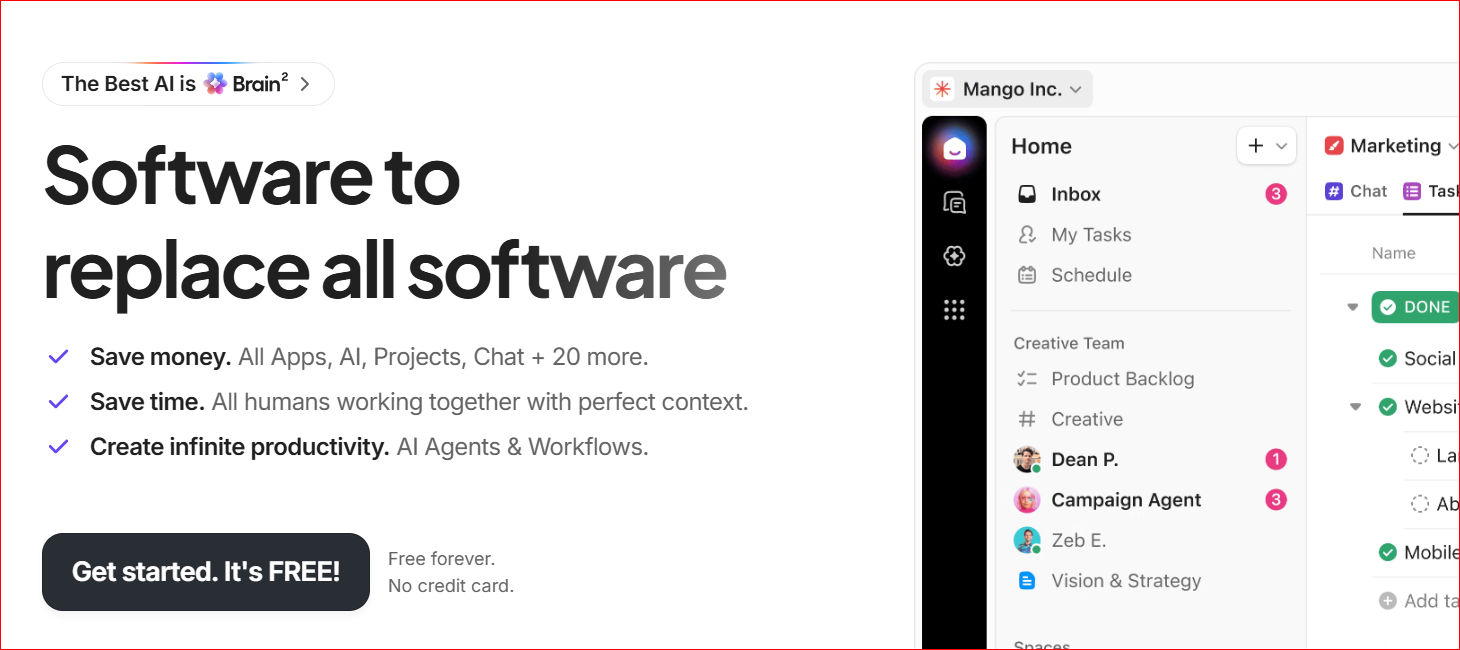
For agencies with complex internal workflows, ClickUp offers far more agency project management features than most competitors.
ClickUp stands excels here.
You can break large projects into tasks, subtasks, and checklists, then assign them to team members with due dates, priorities, and custom statuses.
Dependencies make it easy to show which tasks must be completed before others can begin, helping teams avoid bottlenecks.
ClickUp also supports recurring tasks, task templates, comments, attachments, and time estimates. This makes it a strong choice for agencies that follow repeatable delivery processes.
ClickUp gives each team member the flexibility to choose the view that works best for them.
Popular views include:
ClickUp can automate many of the repetitive tasks that slow teams down.
For example, you can automatically:
These automations save time and help teams follow the same process without needing manual updates.
ClickUp includes dashboards that let managers track project progress, team workload, time spent on tasks, and overall productivity.
You can build custom reports using widgets to monitor the metrics that matter most to your business.
This visibility helps agency owners spot delays early and make better decisions about staffing and project timelines.
ClickUp integrates with tools like Google Workspace, Slack, Zoom, GitHub, Figma, Dropbox, OneDrive, Zapier, and many CRM platforms.
For agencies that already have an established tech stack, these integrations reduce manual work and help keep information flowing between systems.
Overall, ClickUp is a great choice for agencies that need advanced internal project management. The challenge is that nearly all of its features are built for your team, not your clients. That becomes a much bigger limitation once your agency starts managing recurring client work.
ClickUp was built to help internal teams manage work. It wasn't designed around the day-to-day experience of agency clients.
If you run a productized agency, you'll quickly notice that many client-facing features are either missing or require extra tools and manual work.
Many clients want a simple place where they can submit requests, check progress, review files, and communicate with your team.
ClickUp doesn't provide a branded client portal for this experience. While you can invite clients into your workspace or share views with them, they still interact with ClickUp's interface instead of a portal that reflects your agency's brand.
For agencies that want to deliver a polished client experience, this is less professional.
Many productized agencies sell monthly design, marketing, or development subscriptions.
ClickUp doesw include recurring billing, subscription management, or client payments. You'll need to connect separate tools like Stripe, QuickBooks, or another billing platform to manage invoices and recurring payments.
This means your delivery process and your billing process live in different systems, creating more admin work for your team.
Clickup's client features are limited.
For example, there are no built-in request queues, branded intake forms, or client dashboards that show all active work in one place. Agencies often end up building custom workflows with forms, automations, shared folders, and guest accounts to fill these gaps.
The result works, but it takes time to build and maintain.
ClickUp offers hundreds of features, settings, and customization options. That flexibility is useful, but it also makes the platform harder to learn.
New team members may need training before they can use it confidently. Even experienced users can spend a lot of time setting up spaces, folders, lists, views, permissions, and automations before the platform matches their workflow.
If your team wants to get started quickly, ClickUp might overwhelm them.
The platform includes tools for software development, product roadmaps, sprint planning, docs, goals, whiteboards, AI, and much more.
Most creative and productized agencies don't need all of these features.
For agencies focused on recurring client work, the biggest issue with ClickUp is that the client experience is an afterthought. Your team may enjoy using ClickUp, but your clients still need a better way to submit requests, track progress, and manage their services.
If those client-facing gaps are a dealbreaker, it's worth browsing ClickUp alternatives built with delivery and client visibility in mind.
Notion gives you a flexible workspace that you can shape around the way your team works. It combines documents, databases, notes, and lightweight project tracking in one platform.
That can be a major advantage for agencies that value simplicity and flexibility.
You can build almost any workflow you want.
You can create project trackers, content calendars, client wikis, meeting notes, onboarding guides, and task boards without needing separate tools. Teams are free to organize their workspace in a way that matches their own processes instead of following a fixed structure.
This flexibility makes Notion one of the more popular creative project management tools for marketing agencies, consultants, and startups.
Notion shines when it comes to storing and sharing information.
Many agencies use it as their internal knowledge base for:
Because everything lives in one searchable workspace, team members can quickly find the information they need without digging through shared drives or old Slack messages.
Notion has a much cleaner interface, compared to ClickUp,
The editor feels more like writing in a document than managing a complex project management system. Pages are easy to create, edit, and organize, making the platform less intimidating for new users.
Most teams can start using Notion with very little training, which helps speed up adoption across the agency.
You can create databases for projects, clients, content, or almost anything else, then view the same information in different ways.
Available views include:
For example, a content agency could manage blog articles in a table while the writing team views the same data as a Kanban board and managers use a calendar to track publishing dates.
Notion makes it easy for team members to leave comments, share updates, document decisions, and work together across different time zones. Teams can review pages, suggest edits, and keep important conversations attached to the work itself.
For remote agencies, this creates a clear record of decisions and reduces the need for long email threads or constant meetings.
Overall, Notion is an excellent tool for documentation, knowledge sharing, and lightweight project tracking.
But those strengths come with trade-offs, especially for agencies that need deeper project management and client-facing workflows.
Notion wasn't built to run an agency.
As your client list grows and your workflows become more complex, you'll likely find yourself adding more templates, more databases, and more third-party tools just to keep everything running smoothly.
Notion includes task boards, timelines, and databases, but it doesn't offer the same depth as a dedicated project management platform like ClickUp.
Features such as advanced workload management, built-in time tracking, task dependencies, and detailed reporting are either missing or require outside tools and custom setups.
For small teams, this may not be a problem. But agencies handling dozens of projects at once often outgrow Notion's project management capabilities.
Like ClickUp, Notion doesn't give agencies a branded client portal.
You can share pages with clients, but they're simply viewing or editing content inside Notion. There's no client dashboard where they can log in, submit work, track requests, manage files, or see the status of every project under your agency's branding.
That makes it harder to deliver the polished client experience many productized agencies want.
While Notion now supports forms for databases, they're fairly basic compared to tools built for client request management. Agencies that need detailed project briefs, file uploads, approval steps, or conditional questions will often need to use another form builder and connect it to Notion.
Notion has no built-in way to manage recurring payments, subscriptions, retainers, or invoices.
If your agency sells monthly services, you'll need separate tools for billing and payment collection. Your clients submit work in one place, pay in another, and receive invoices from somewhere else.
Keeping these systems in sync takes extra effort as your business grows.
Notion works well when you're managing a small number of clients.
As your agency grows, things become harder to organize. You may end up creating separate pages, databases, and templates for every client. Permissions also require careful management to make sure clients only see the information meant for them.
Over time, this can make your workspace harder to manage and easier to break.
For agencies that deliver recurring services, Notion's biggest weakness is that everything has to be built from scratch.
Instead of using a platform designed for client delivery, you're creating your own system and maintaining it as your agency grows.
Depending on how your agency operates, one may be a better fit than the other.
Winner: ClickUp
If your agency's work revolves around tasks, deadlines, and project timelines, ClickUp is the stronger choice.
It offers subtasks, task dependencies, recurring tasks, custom workflows, workload management, and detailed reporting. These features make it much easier to manage large projects with multiple team members.
Notion can track tasks through databases and boards, but it lacks many of the advanced project management features agencies need as they grow.
For more on structuring this well, see our guide to project management best practices for agencies.
Winner: Notion
Notion is hard to beat when it comes to storing information,
It's an excellent place to keep SOPs, client documentation, onboarding guides, meeting notes, and internal knowledge. Everything is easy to organize, search, and update.
ClickUp includes Docs, but documentation isn't its main strength. Most teams find Notion's writing experience cleaner and easier to use.
Winner: Neither
Neither platform is designed around client communication.
You can invite clients into ClickUp or share Notion pages with them, but neither tool gives clients a dedicated portal where they can log in, submit requests, track progress, and review deliverables..
Winner: Neither
Both tools offer ways to collect information, but neither was built for structured client intake.
ClickUp Forms work well for collecting basic information, while Notion Forms can send responses into databases.
But neither provides the complete intake experience productized agencies often need, such as branded request forms, approval workflows, and request queues.
Most agencies end up using extra tools to fill these gaps.
Winner: ClickUp
ClickUp includes dashboards that track project progress, workloads, time tracking, and team performance. Managers can build custom reports without relying on third-party tools.
Notion can display project data through databases, but it doesn't offer the same level of reporting or project insights.
Winner: Notion
Notion is much easier to learn.
Its clean interface and simple page editor make it easy for new team members to get started. Most people can begin creating pages and databases within a few minutes.
ClickUp offers far more features, but that also makes it more complex. Teams usually spend more time learning the platform and setting up workflows.
Winner: ClickUp
In ClickUp, you can automatically assign tasks, update statuses, send notifications, create recurring work, and trigger actions based on specific events. These automations help agencies reduce manual work and keep projects moving.
Notion supports automation through integrations and connected tools, but its built-in automation capabilities are more limited.
Winner: ClickUp
As agencies grow, projects become more complex and teams become larger.
ClickUp is better prepared for that growth. Its advanced permissions, reporting, automations, workload management, and project views make it easier to manage dozens of clients and hundreds of active tasks.
Notion can certainly grow with a business, but large workspaces often require more manual organization and ongoing maintenance.
There's no single winner when it comes to productivity because it depends on how your agency works.
ClickUp will likely improve productivity more if your team spends most of its time planning projects, assigning work, and tracking deadlines,
If your team spends more time creating documentation, sharing knowledge, and building internal processes, Notion is the better fit.
But both tools share the same weakness.
They focus almost entirely on your internal team. They do very little for the client experience, which is why many productized agencies eventually add a dedicated client portal and request management platform to their workflow.
The real challenge (for productized agencies) is giving clients an easy way to submit requests, track progress, approve work, and manage their service without sending emails or chasing updates.
ClickUp and Notion fall short here.
ClickUp and Notion are designed for internal collaboration.
While you can invite clients into both platforms, the experience is still built around how your team works, not how your clients interact with your agency.
As a result, clients often end up navigating tools they were never meant to use.
A productized agency should have a central place where every client can log in and manage their relationship with your business.
Clients should be able to:
Neither ClickUp nor Notion offers this type of branded client portal.
Instead, clients either receive shared links or guest access to your workspace. While this gives them visibility, it doesn't create the polished experience many agencies want to deliver.
If you're looking for a dedicated client portal for agencies, you'll need a platform built specifically for client-facing work.
Ideally, billing and service delivery should work together, for productized agencies. A client signs up, pays their subscription, submits requests, and tracks delivery from the same place.
Neither ClickUp nor Notion supports this workflow.
You'll need separate tools for recurring billing, invoices, and payment management, then connect them to your project management system. This adds extra software and more admin work.
ClickUp and Notion both provide basic forms, but they're not designed for structured client requests. Features like branded intake forms, request categories, approval steps, and request queues often require custom setups or additional tools.
As your agency grows, these workarounds become harder to manage.
Productized agencies benefit from dedicated client request management software that makes submitting work simple for every client.
Clients want answers without having to send an email.
They want to know:
Neither ClickUp nor Notion gives clients this experience out of the box. To provide that level of visibility, agencies often build complex permission settings, shared dashboards, or custom workflows.
A platform with built-in project management software with client portal features solves this problem by giving clients their own dashboard while keeping your internal workspace separate.
The bottom line is productized agencies need a platform that connects clients directly to the delivery process through request intake, progress tracking, billing, and communication, all in one place.
For productized agencies, there's another option worth considering.
ManyRequests was built specifically for agencies that sell recurring services. Instead of focusing only on task management, it brings together the client experience, request management, and billing in one platform.
That means your team can manage work while your clients have a dedicated place to interact with your agency.
For a wider view of the market, check out our roundup of the best client portal software for agencies.
Unlike ClickUp and Notion, ManyRequests gives every client access to a branded portal.
Clients log in through a portal that matches your agency's branding instead of a third-party workspace.
That's the core idea behind white label project management software: your tools, your brand, not a vendor's.
From there, they can submit requests, check project status, review deliverables, and communicate with your team.
This creates a more professional experience and reduces the need for long email threads.
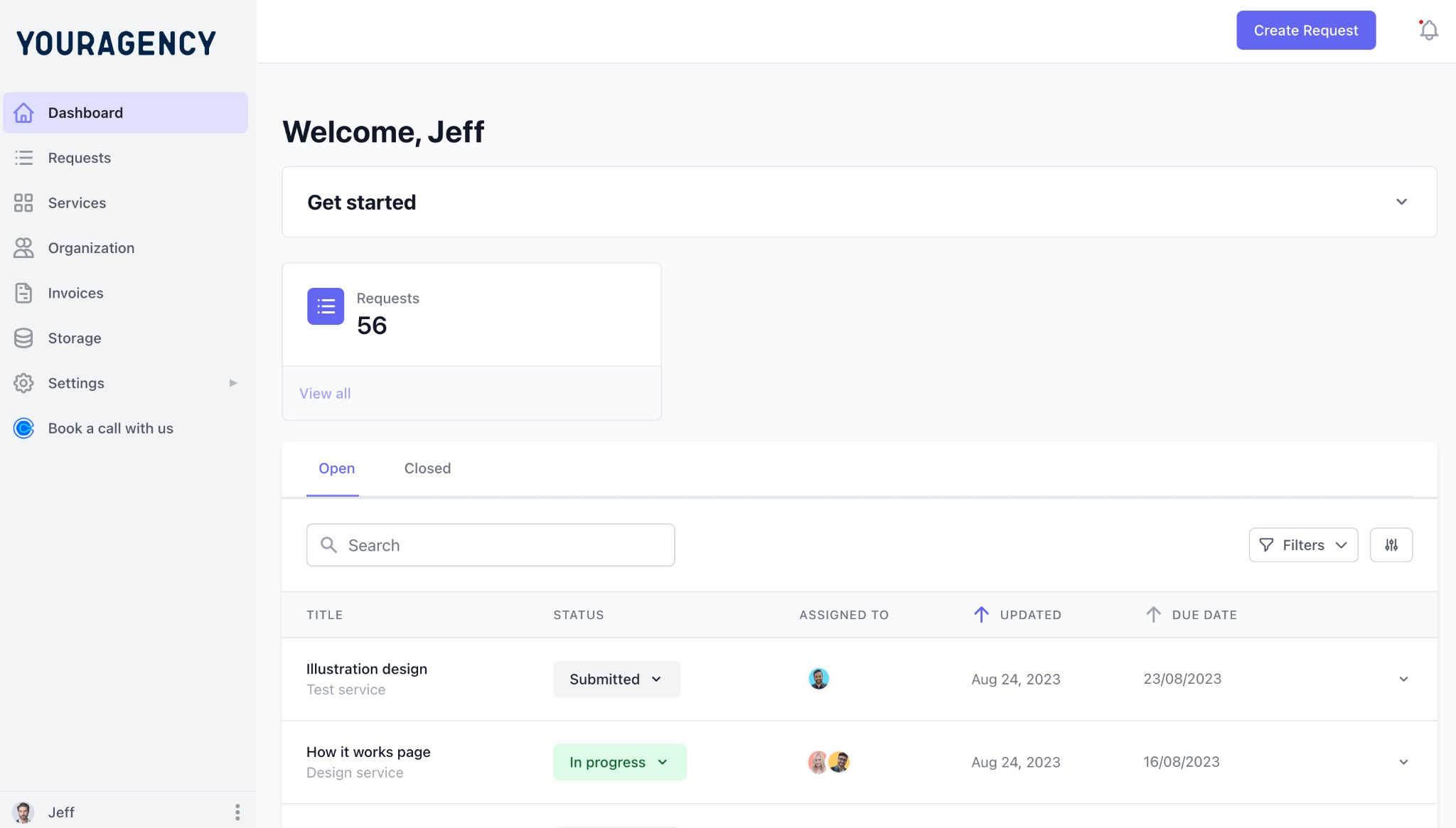
ManyRequests Client Portal (client view)
Productized agencies depend on collecting the right information before work begins.
ManyRequests lets you build custom request forms that clients complete when submitting new work. You can collect project details, upload files, ask required questions, and create different forms for different services.
Instead of chasing information through email or Slack, every request starts with a complete brief.
As your agency grows, it becomes harder to keep track of work across dozens of clients.
ManyRequests solves this with a centralized request queue. Your team can see every active request, its status, priority, and assigned team member from one place.
This makes it easier to manage recurring work without jumping between multiple client workspaces.
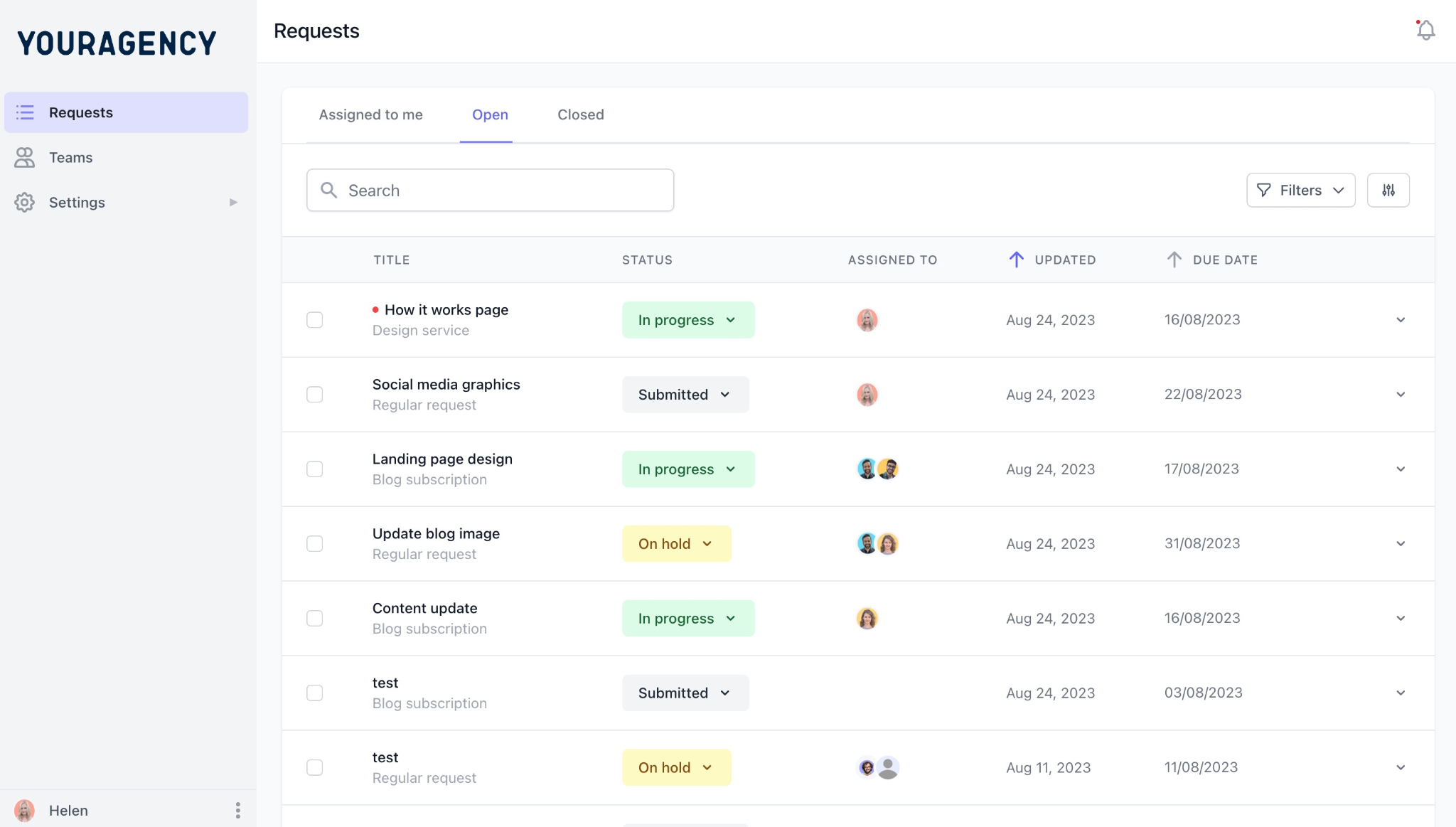
ManyRequests Request Queue
With ManyRequests, recurring billing is part of the platform. Clients can subscribe to your services, manage their plan, and make payments without using a separate billing system.
Because billing and service delivery live together, there's less manual work for your team and a smoother experience for your clients.
Sharing files should be part of the delivery process, not a separate task.
ManyRequests keeps files, conversations, approvals, and project updates inside each client request. Team members and clients always know where to find the latest version of a deliverable, making reviews much easier.
ClickUp is the best choice if your priority is advanced internal project management with powerful automations and reporting.
Notion is the better option if your team needs a flexible workspace for documentation, SOPs, and lightweight project tracking.
ManyRequests is different because it focuses on the client side of agency operations. It gives clients a branded place to submit work, track progress, manage subscriptions, and communicate with your team, while giving your agency the tools to deliver recurring services efficiently.
For productized agencies, that's often the missing piece that neither ClickUp nor Notion provides.
There's no single winner because ClickUp, Notion, and ManyRequests solve different problems.
The right choice depends on how your agency works and, more importantly, how your clients interact with your business.
Choose ClickUp If...
Your agency needs advanced project management. ClickUp is built to help your team stay organized behind the scenes. If internal operations are your biggest challenge, it is a strong choice.
Choose it if you:
Choose Notion If...
Your agency values flexibility over advanced project management. Notion works especially well as an internal knowledge base. Many agencies also use it alongside other project management tools rather than as their only platform.
Choose it if you:
Choose ManyRequests If...
You run a productized agency that delivers recurring client work. Instead of emailing PDFs, chasing missing information, or collecting project briefs through long email threads, you can build your onboarding forms directly into your client intake process.
For example, if your agency uses a branding questionnaire, clients can complete it as part of their first request, giving your team everything needed to start work immediately.
Choose it if you:
ManyRequests combines client intake, request management, billing, and a branded client portal in one platform, making it a better fit for agencies that sell recurring services rather than one-off projects.
Yes, for most agencies. ClickUp offers more advanced project management features, including task dependencies, workload management, time tracking, reporting, and workflow automations. Notion can manage projects, but it’s better suited for lightweight task tracking and documentation than complex project management.
Not completely. Both platforms let you share information with clients, but neither provides a branded client portal built for agency workflows. If your clients need to submit requests, track progress, review deliverables, and manage their subscription from one place, you'll need a dedicated client portal platform such as ManyRequests.
Notion is generally easier to learn. Its clean interface and simple page editor make it easy for new users to get started. ClickUp offers many more features, but that also means a steeper learning curve and more time spent setting up your workspace.
It depends on what you're trying to manage. ClickUp is a strong choice for internal project management, while Notion works well for documentation and knowledge sharing. But productized agencies usually need more than internal task management.
A platform like ManyRequests combines client request management, a branded client portal, and subscription billing in one system.
No. ClickUp allows you to invite guests and share views with clients, but it doesn't include a dedicated branded client portal. Clients still interact with the ClickUp interface rather than a client experience designed around your agency.
Yes, but with limitations. Notion can organize client projects using databases, pages, and task boards. But it lacks advanced project management features, built-in billing, and a branded client portal. As an agency grows, managing multiple client workspaces in Notion often requires more manual work and additional tools.
If your agency handles recurring client work, the comparison that matters most is whether your clients have a simple way to submit requests, track progress, review deliverables, and manage their subscription.
Neither ClickUp nor Notion was built for that.
ManyRequests fills that gap. It combines a branded client portal, structured request intake, subscription billing, and request management in one platform, giving both your team and your clients a better experience.
If you're ready to spend less time chasing emails and more time delivering great work, start your free ManyRequests trial today and see how a client-first workflow can help your agency scale.
1. See how ManyRequests works in real life. Start a free trial and experience how productized agencies centralize requests, reduce chaos, and streamline delivery, without changing their entire workflow.
2. Read our Implementation Guide to launch smoothly with your team and clients.
3. Follow us on LinkedIn and YouTube for practical agency growth strategies
4. Check out The Productize Blueprint to learn how to turn your services into a scalable, productized offer.
William Nzewi is a data scientist and a writer. He likes to read and learn new things, especially about tech, business and life.