Top 5 Design Approval Software for Creative Agencies in 2026
Discover the best design approval software for creative teams managing revisions, feedback, and approvals.

Adetola Rachael Iyanuoluwa

A social media specialist is frustrated.
Their team plans content six to seven weeks in advance, every post they schedule has to pass through the social manager, and sometimes two more departments, then wait in line for a design team that sends receivables in 14 days.
By the time a post is ready, the trend it was meant to ride is long gone, because they have a set approval process that's boxing them in.
Btw, this happened to a real agency. You can read it here, but come back when you're done, will you?
Your agency may not experience this problem, but you probably still wait on feedback and design approvals from stakeholders through email threads and Slack, where you can't really get precise feedback.
What you need is a design approval software that gives your creative team one path from draft to decision. In this article, I will compare some of the best design approval tools to manage design feedback and speed up your approval.
If you’re like the SMS in that Reddit post, and you need a tool that can improve your approval process, here's what you should look out for:
Your clients and team members should be able to comment directly on the design, rather than in a separate email. The software should be able to allow them to:
Every task and asset that passes through the team should have an unambiguous status (Pending feedback, In review, Changes requested, Approved) that anyone (including your client's team) can understand at a glance.
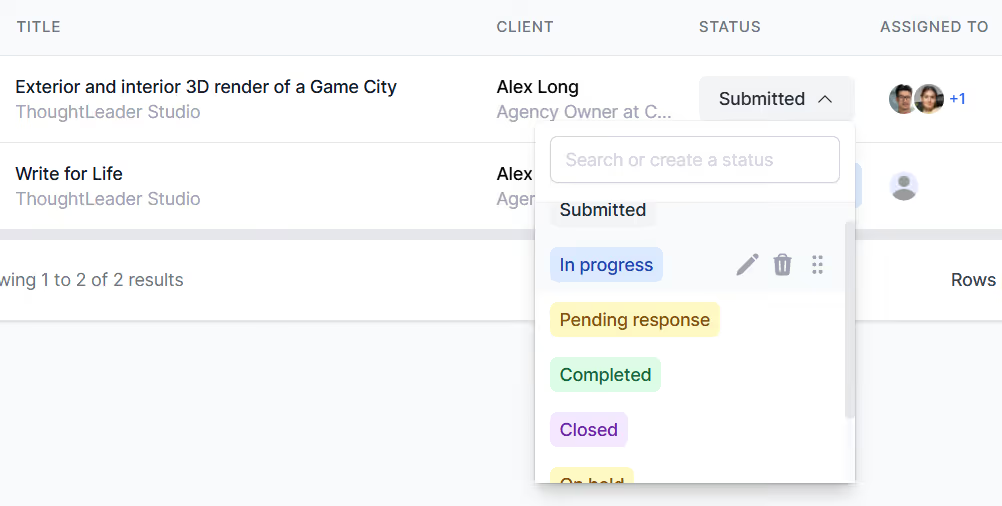
This shows you which team member is causing the delay.
As a creative agency handling creative work, you’d do a lot of revisions. The tool you choose should be able to:
Not everyone involved in a project should have the same level of visibility or control. A good approval tool lets you customize who can access the design, and where they can access it from.
The system should be able to set due dates on every asset, and send automatic reminders to anyone stalling the feedback. It should also be able to escalate it when some of your team members let feedback slip.
The point is it should be able to do all the grunt work of your creative approval process for you.
These are five creative design approval platforms for your agency:
ManyRequests is a white-label client portal that helps creative agencies manage design requests, feedback, approvals, and billing in one place.
On the platform, your clients can submit briefs, review mockups, leave comments, and approve final designs, while your team tracks revisions and automates invoicing behind the scenes.
Let's see some of its features:
ManyRequests adds a built-in feedback panel to every client request. You can upload a design (PDF, image, video, or slide) and the client is able to comment directly on the file.
It looks like this:
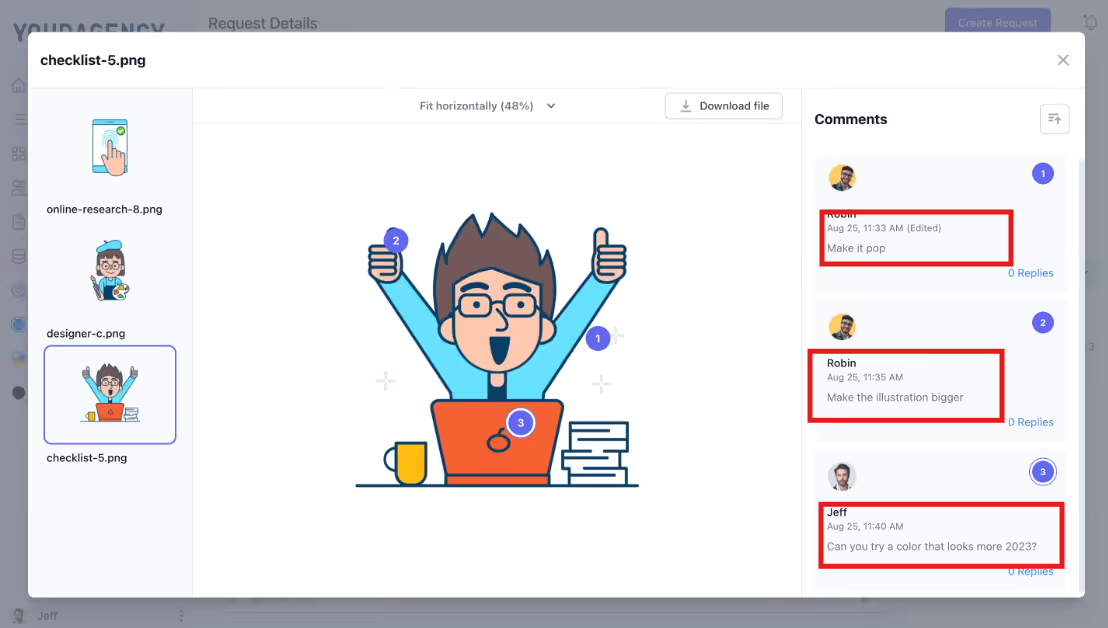
When you send the design document, like we did here, the client can click on any part of the document to highlight the changes they want your designer to effect.
In the image above, the round dots are areas that the client gave feedback on.
Every round dot is connected to a comment thread, where your team can respond and mark the comments as resolved.
This way, your team doesn't have to chase notes around on Slack, and it's easier for your clients to review and approve work inside the portal.
Every ManyRequests workspace comes with a fully branded client portal. Your agency gets full autonomy to customize your domain, logo, colors, and messaging to your preference.
When a client logs in, they see your agency’s brand, not ManyRequests’.
See what ManyRequests’ dashboard looks like:
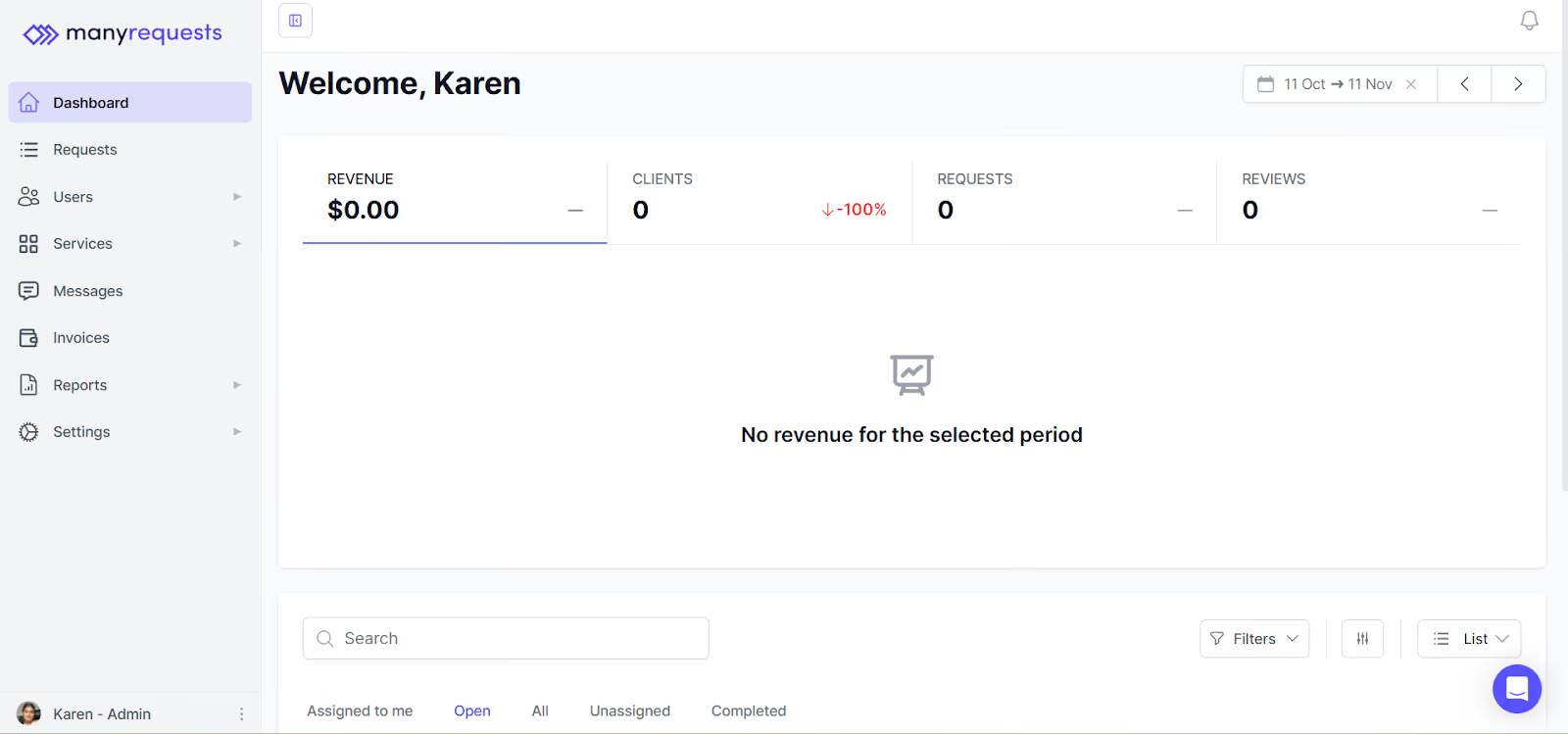
And this is how Prontto, customized it to fit their branding:
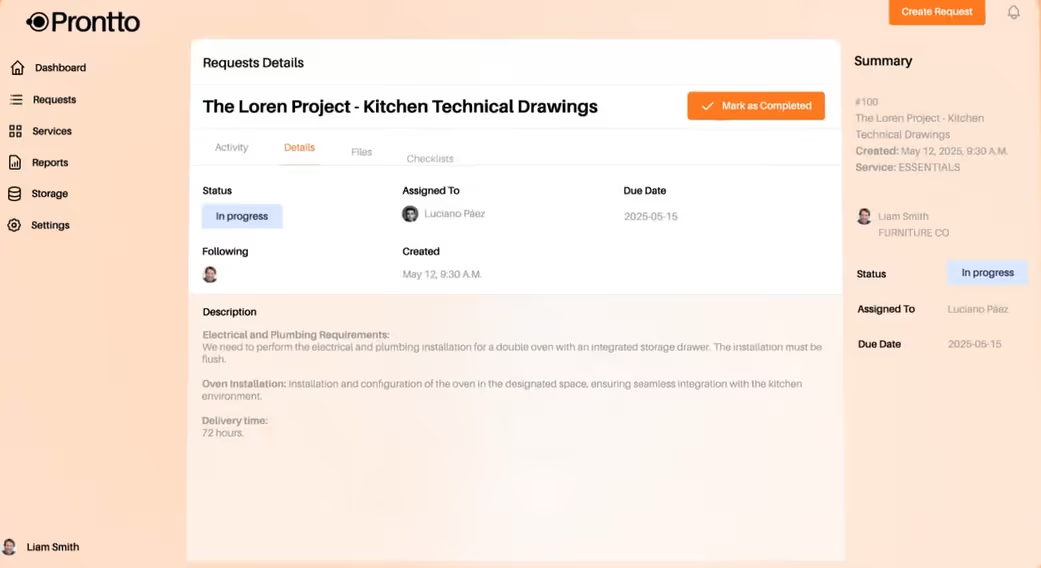
From this portal, the client can submit requests, track project progress, give feedback, and manage invoices. It's basically an extension of your system that belongs to them.
And the cherry on top is that everything’s centralized. You get a bird’s-eye view of every project, who it's assigned to, due dates, status, and other information from your dashboard.
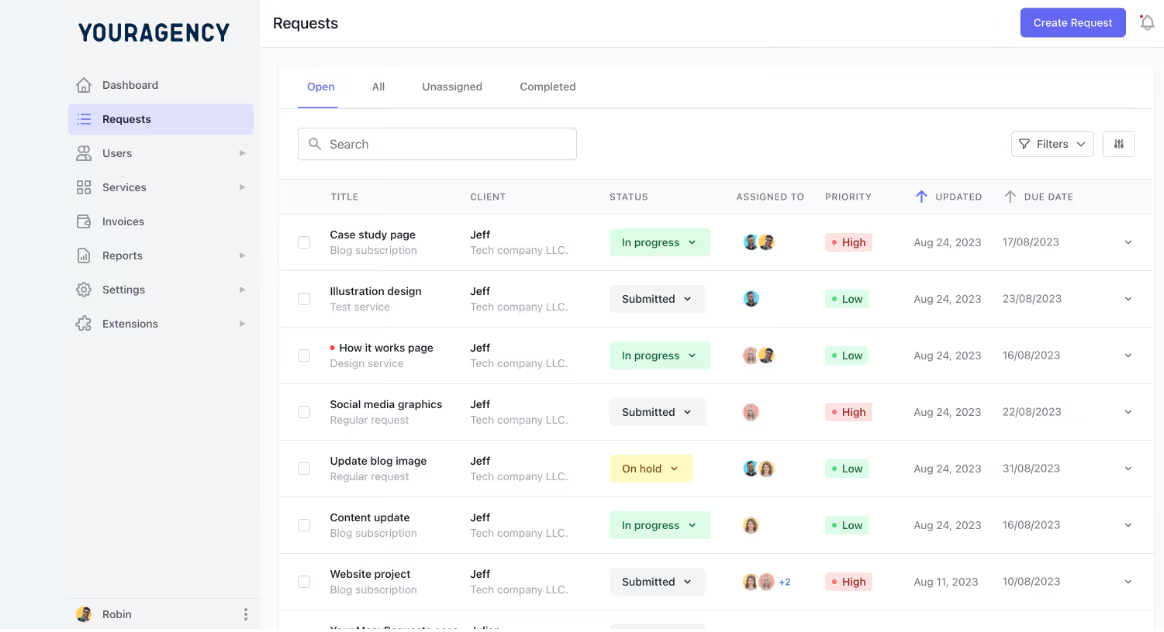
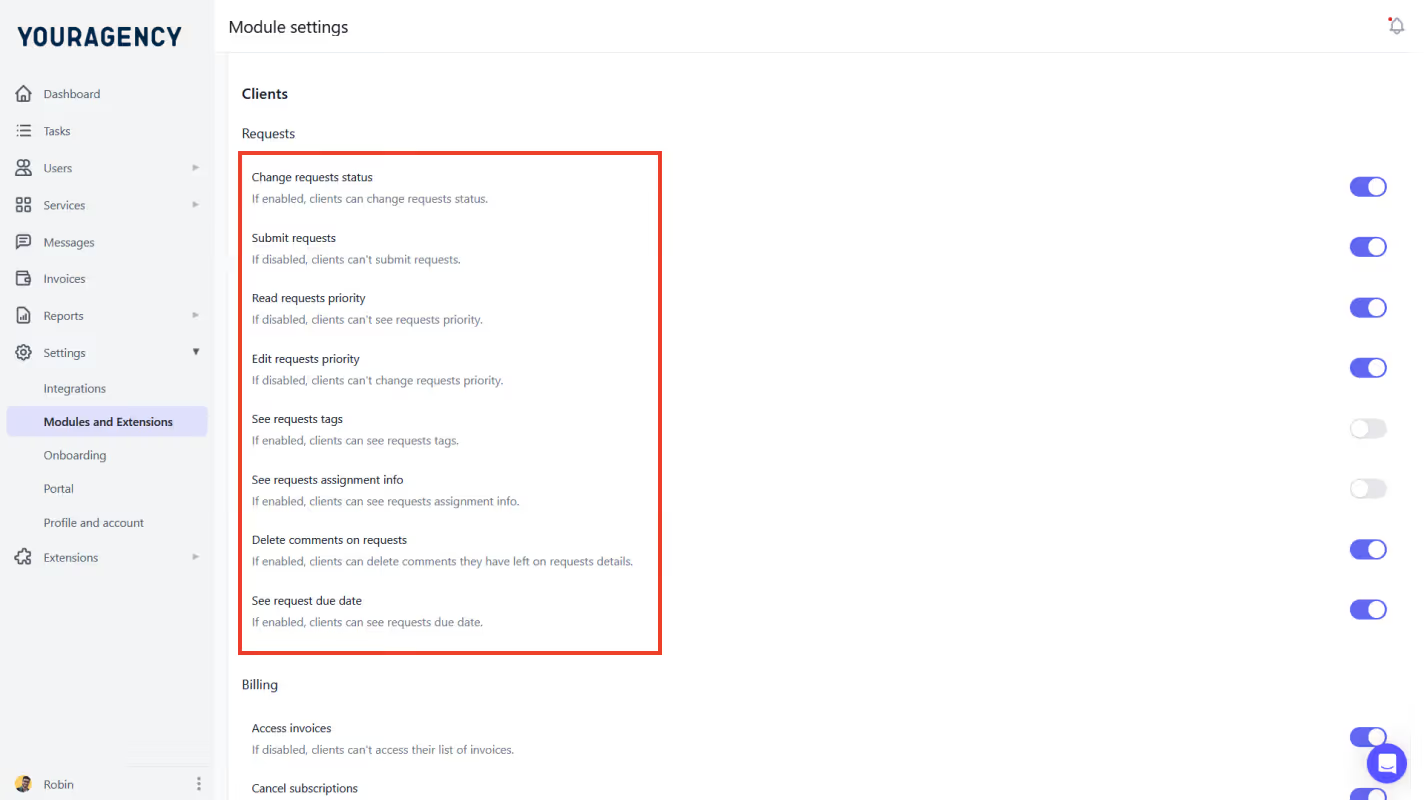
You also control what clients see. Each client has their own dashboard where they can also see requests, files, statuses, and due dates. You can use visibility rules to show only what’s relevant to them like their active tasks, past invoices, and file approvals.
ManyRequests connects your service delivery with how you get paid. It ties every client request, task, and tracked hour into the billing system, so you can send accurate invoices.
You decide how to bill (per request, per hour, or on a recurring subscription). And when you complete the client's request, ManyRequests generates the invoice automatically with pre-filled request name and rate.
If you're tracking time, ManyRequests also provides a time tracking feature that you can use to log how much time your team spends on a task and convert it to invoice based on your rate.
The client can pay their bill directly through the portal with Stripe without leaving the platform. On your part, you can set payment deadlines and send automated reminders, and the client pays when they get it.
You do everything in the portal. Everything.
When your client sends in a request, ManyRequests automatically creates a task based on that request. You can then assign, schedule, and track the tasks you create through the dashboard.
You can also switch between workflow views, like the list or Kanban view.
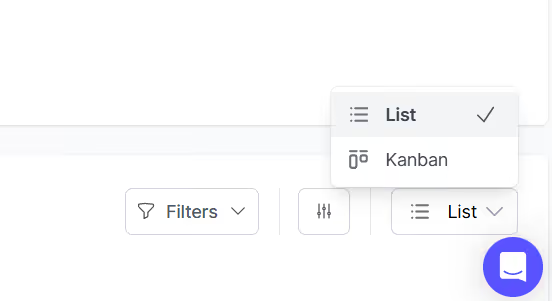
ManyRequests provides tasks status as the request moves through your team members.
Each task you assign moves through custom stages like Submitted, in Progress, Pending response, and so on.
The assigned team members update the status and the project goes on, so you and the client can be updated automatically.
The best part of this is that everything connected to the request stays attached to the task, including the files, messages, feedback, and time logs.
This means that you don't have to go across several platforms to get things done.
ManyRequests is a great design approval tool, but it's not solely focused on creative proofing. It's more of an all-in-one client portal, but is that even a limitation?
ManyRequests subscription plan starts at $29 monthly for a Starter plan, $59 monthly for its Core plan, and $99 monthly for Pro plan.
Filestage is an online proofing and design approval platform built for agencies and creatives. It’s designed for teams that review high volumes of assets (video, design, web, and more) and don't want to rely on email threads.
These are some of its features:
Filestage lets you create structured review workflows using reviewer groups. Each group represents your client’s department or even your own team.
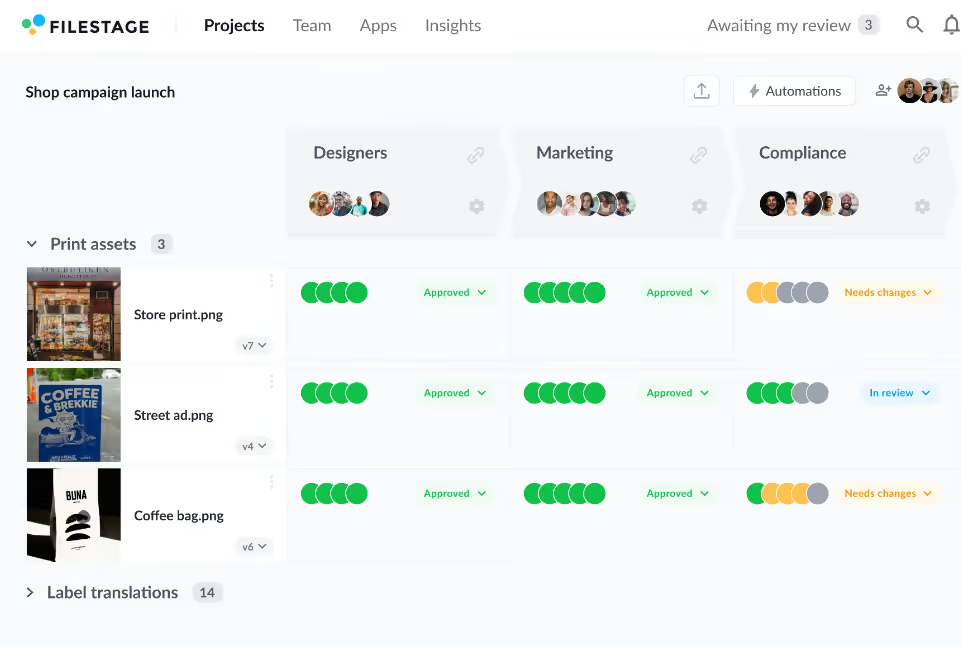
These groups review designs in order, so feedback flows step by step through product, marketing, legal, or any team that needs to sign off before you launch the design.
Reviewers (your team or the client's team) can leave comments on the file and tag team members to it. When a group completes their review, Filestage automatically notifies the next group, so the approval stages flow well without manual input.
Some of the other important features you’ll find in Filestage are:
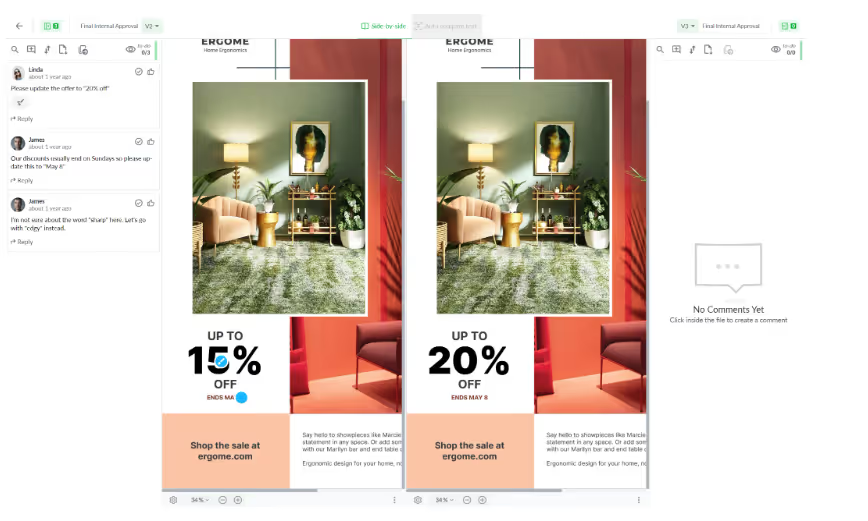
When the reviewers have all sent in their feedback, you can create a new version of your file (the one where all feedback has been implemented), and stack it on your existing file.
Filestage stacks this so every team member knows which version is updated, or not.
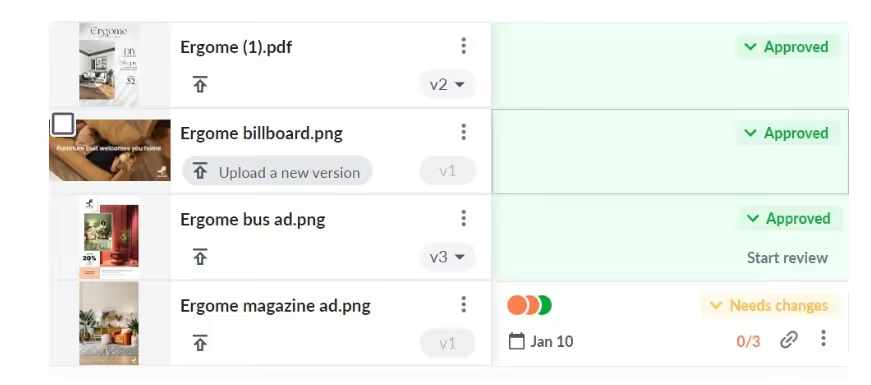
This way, you don't mistakenly send the wrong file to your clients as deliverables.
You can also compare these versions side by side to see all the comments on the old version, and how it's been implemented in the new version during final edit.
You can create review stages each with its own reviewers. Filestage also lets you choose who can comment or approve files in each step, so two groups don't approve at once when they should do it in steps.
Unlike ManyRequests, Filestage has very limited project management capabilities, so if you're looking for a design approval software with built-in task and client management features, this may not be the best choice.
Filestage has a free plan with limited features, and the pricing starts at $109/month for its Basic, $299/month for Professional, and then an Enterprise pricing.
Ziflow is an enterprise‑grade online proofing and design approval platform tailored for creative agencies and marketing teams that handle complex campaigns, high volumes of assets, and multi‑stage review cycles.
These are some of its features:
Ziflow lets you design custom approval workflows that match your agency’s real process.
You can route creative assets through multiple stages, like internal, client, and legal reviews, either one after another (sequentially) or all at once (in parallel).
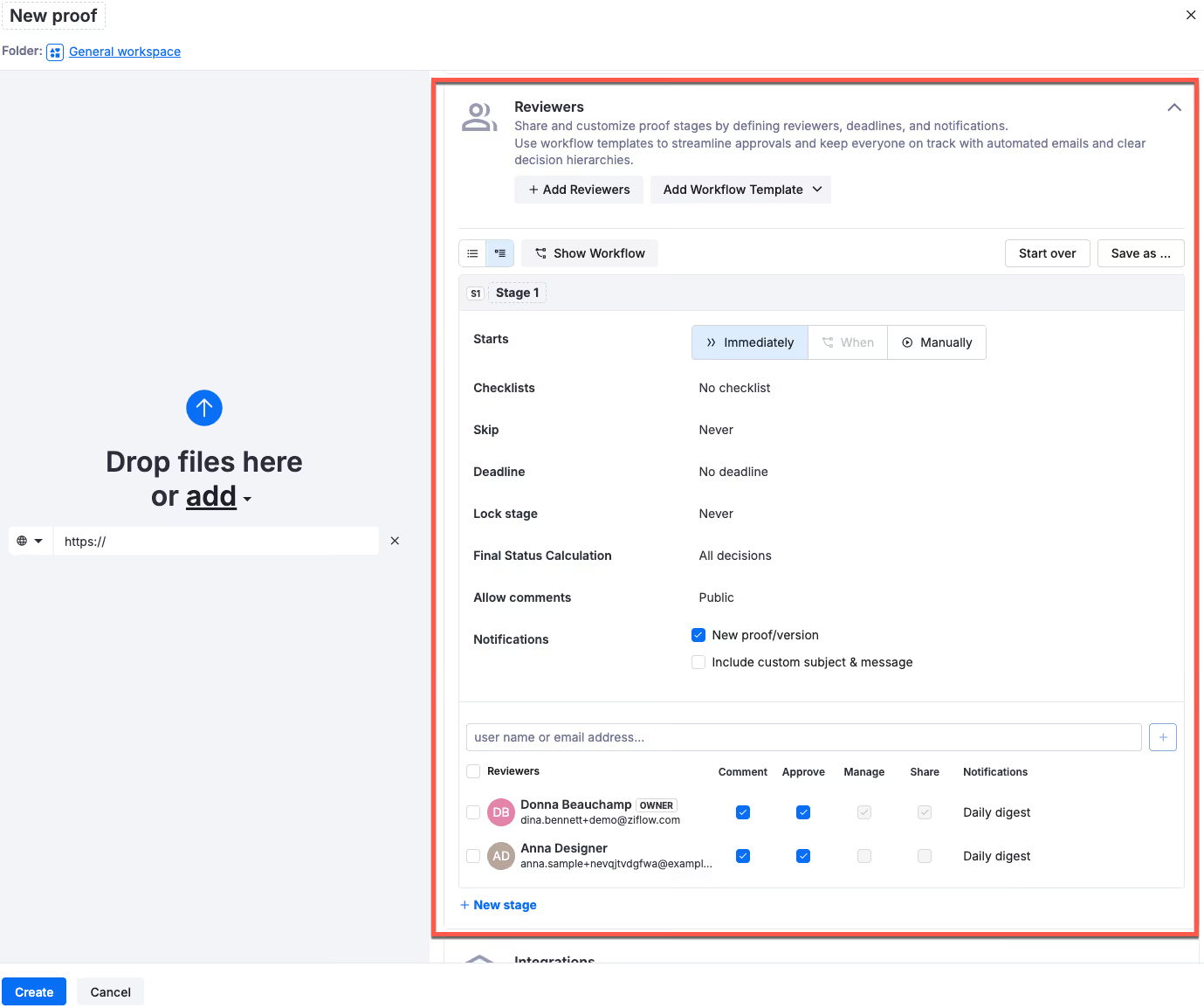
Each stage can have its own reviewers, roles, and permissions. For example, you can assign product managers to approve copy, designers to mark up visuals, and legal to sign off at the end.
You also control what happens next (whether a project moves forward after one approval or requires a full group sign-off).
This structure keeps everyone accountable and ensures feedback moves through the right steps in the right order
Ziflow keeps all feedback right on the file being reviewed.
Your team, client's team, or reviewers can click directly on the content to leave comments at the exact spot where changes are needed.
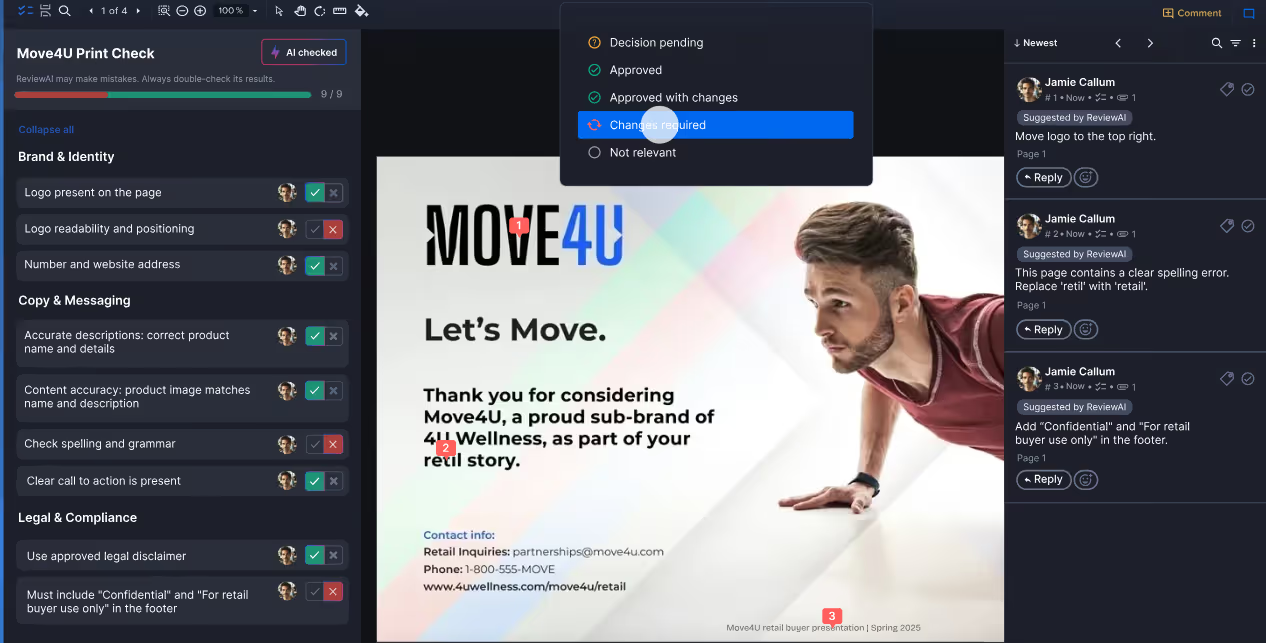
They can draw shapes, use arrows, or highlight sections to make their point visually. This helps your team act on feedback more clearly.
Ziflow saves all these comments in a threaded panel next to the proof, so everyone sees the same discussion in context.
After the reviewer has made and sent the edits, your team can respond to comments or mark them as resolved.
You don’t need to push every update manually.
Ziflow’s automation capabilities can route proofs to the right reviewers at the right time. You can also trigger reminders, so Ziflow can send a notification to your team when the deadline is near.
Ziflow also uses AI‑powered checks (ReviewAI) to check for any brand or compliance issues that don't match your brand checklist, like unapproved fonts and spelling errors. Your designers can fix issues earlier and your clients don't have to point out the basics.
Ziflow is designed for agencies that handle enterprise workflows, so if you are a smaller agency, this could be an overkill for you. And advanced features like ReviewAI are only available on high-tier plans.
Ziflow has a free plan available, then pricing starts at $199/month for the Standard tier, and $329/month for its Pro plan.
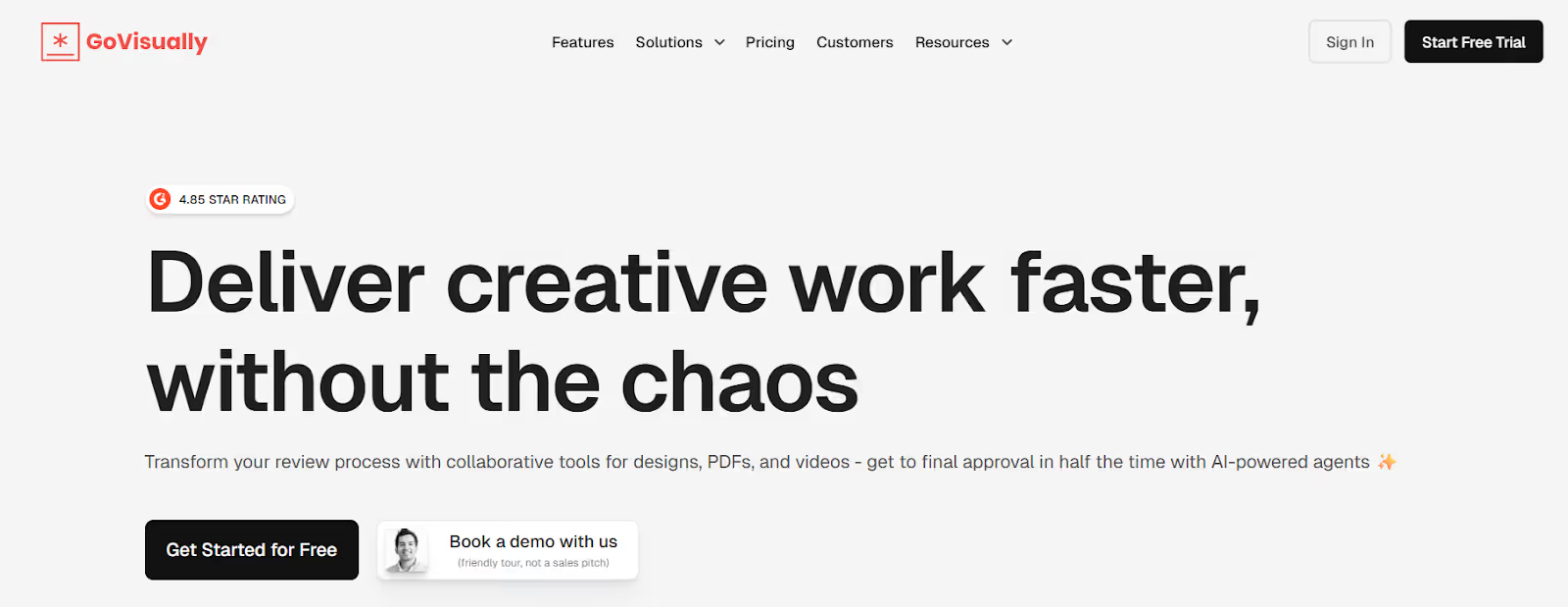
GoVisually is an intuitive online proofing and visual approval software that helps creative teams and agencies collect feedback, make revisions, and get approvals.
It’s built to be easy for both creators and clients, since reviewers can jump in quickly and comment directly on designs and proofs with minimal onboarding.
GoVisually doesn’t try to be a full project manager, instead, it provides these features:
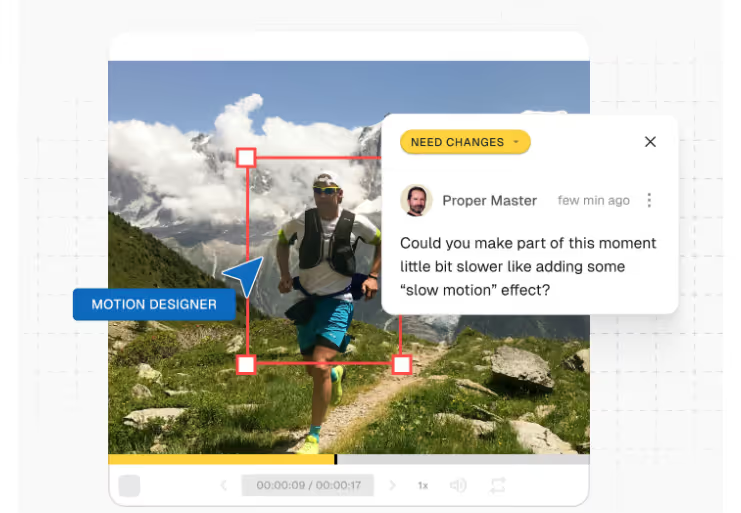
GoVisually lets reviewers leave feedback on the design.
They can annotate a part of the design document they'll change and add a comment to the spot they clicked.
Your designer can see exactly where the client needs correction, with the correction attached to the markups.
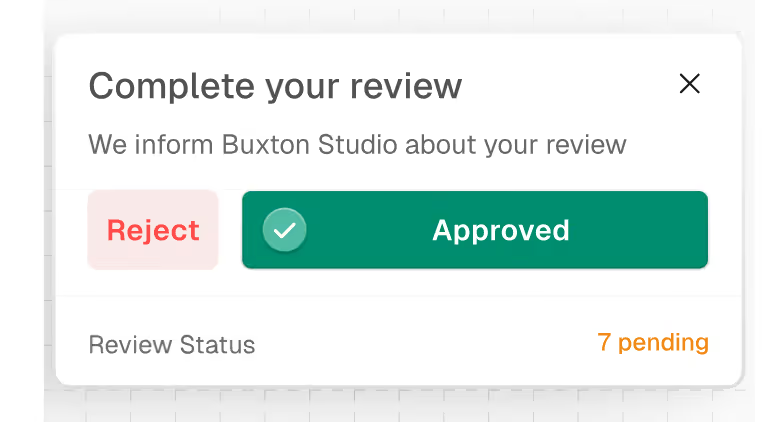
Once reviewers are happy with the design you sent, they can approve it with one click.
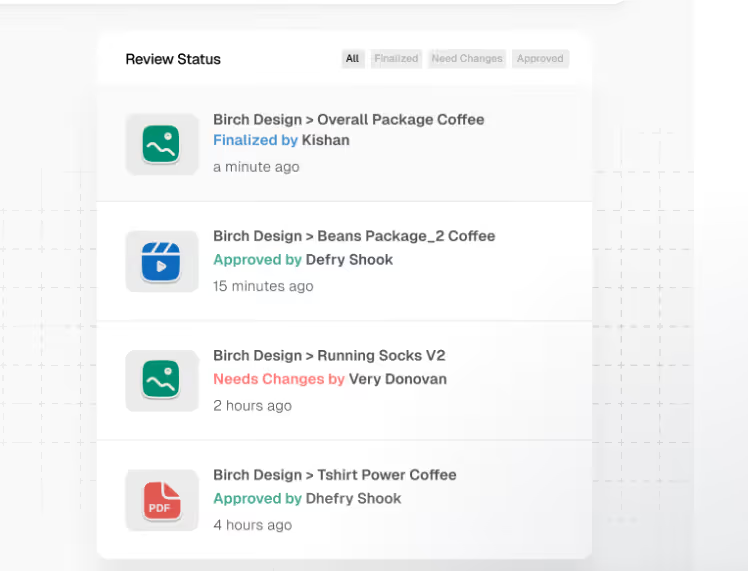
GoVisually keeps track of each file’s status so you instantly see what’s approved, what needs changes, and what’s still waiting for review.
GoVisually also allows you to share proofs through a single link, so your client can review the design document without logging in or creating an account.
All they need to do is click the link, see the file, and they can leave comments or approve in their browser.
GoVisually connects with tools you already use, like Slack for notifications and Adobe Creative Cloud for direct uploads from design apps.
You can also expand connections through Zapier to include dozens more apps.
GoVisually has no structured multi-stage workflow, so you can’t control who reviews first or route approvals through internal teams before sending to clients. Everyone sees the proof at once, which means you’ll still need to manually follow up a bit.
GoVisually pricing starts at $20/user/month for the Lite plan, $40/user/month for Pro, and custom pricing for Enterprise.
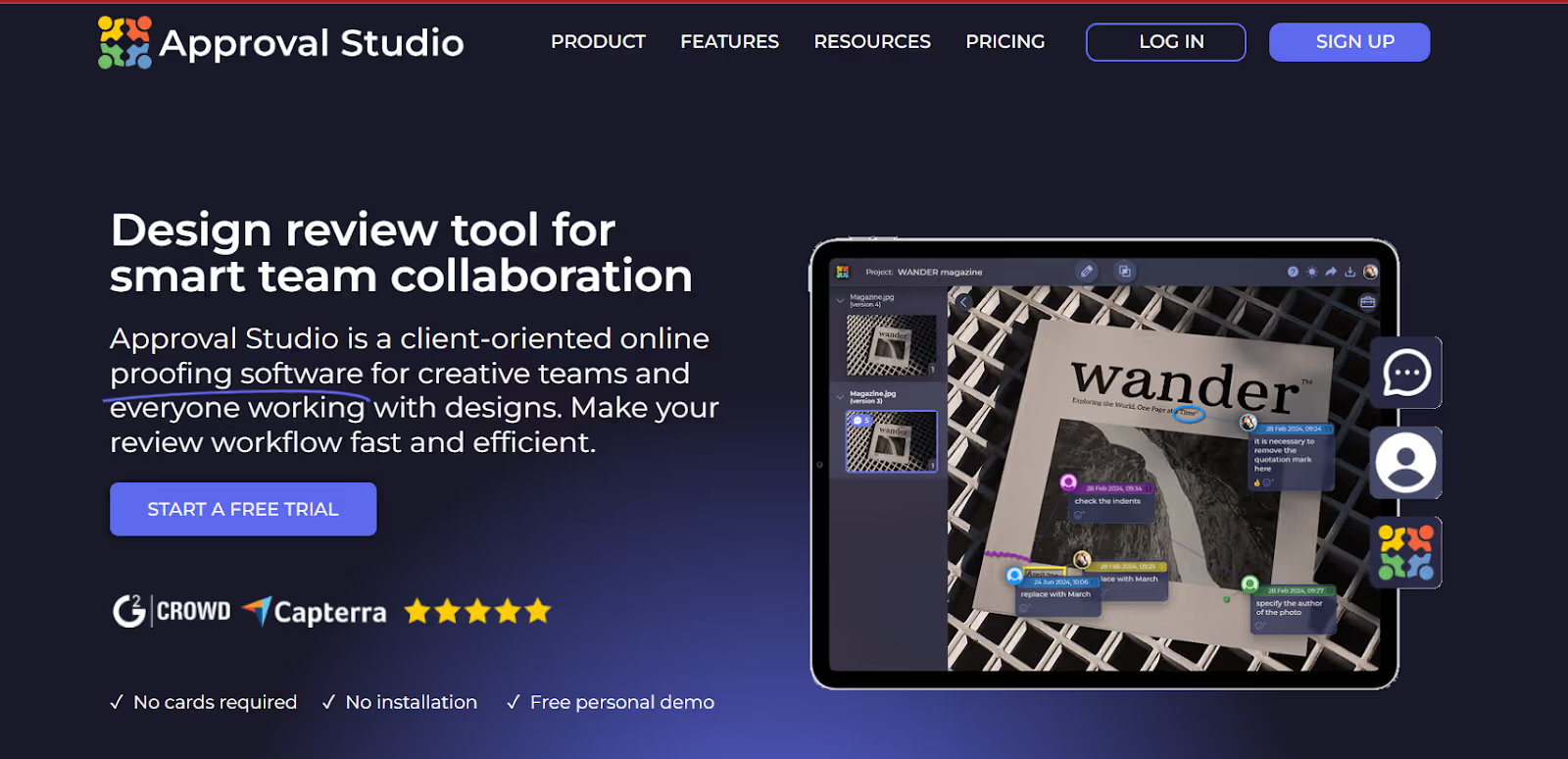
Approval Studio is an online proofing and client design approval software that helps teams and agencies centralize feedback, annotations, and final approvals for design and artwork projects.
It’s built to simplify review loops so you spend less time digging through email threads and more time actually updating work.
Some of its important features are:
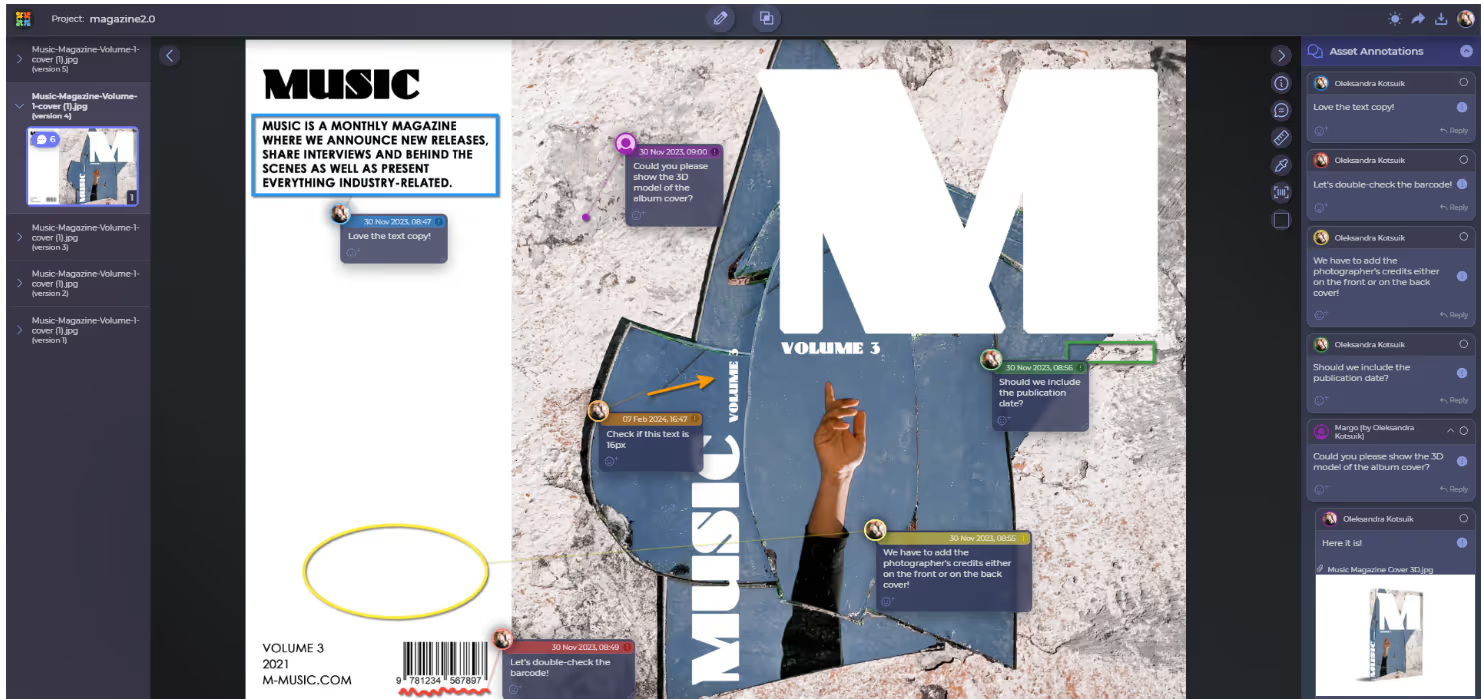
Like every software we’ve discussed before now, Approval Studio also allows direct annotation on design documents. When you upload files like artboards, PDFs, or image formats (JPEG, PNG, AI, etc.) on Approval Studio, your clients can directly leave comments and markups directly on the content itself.
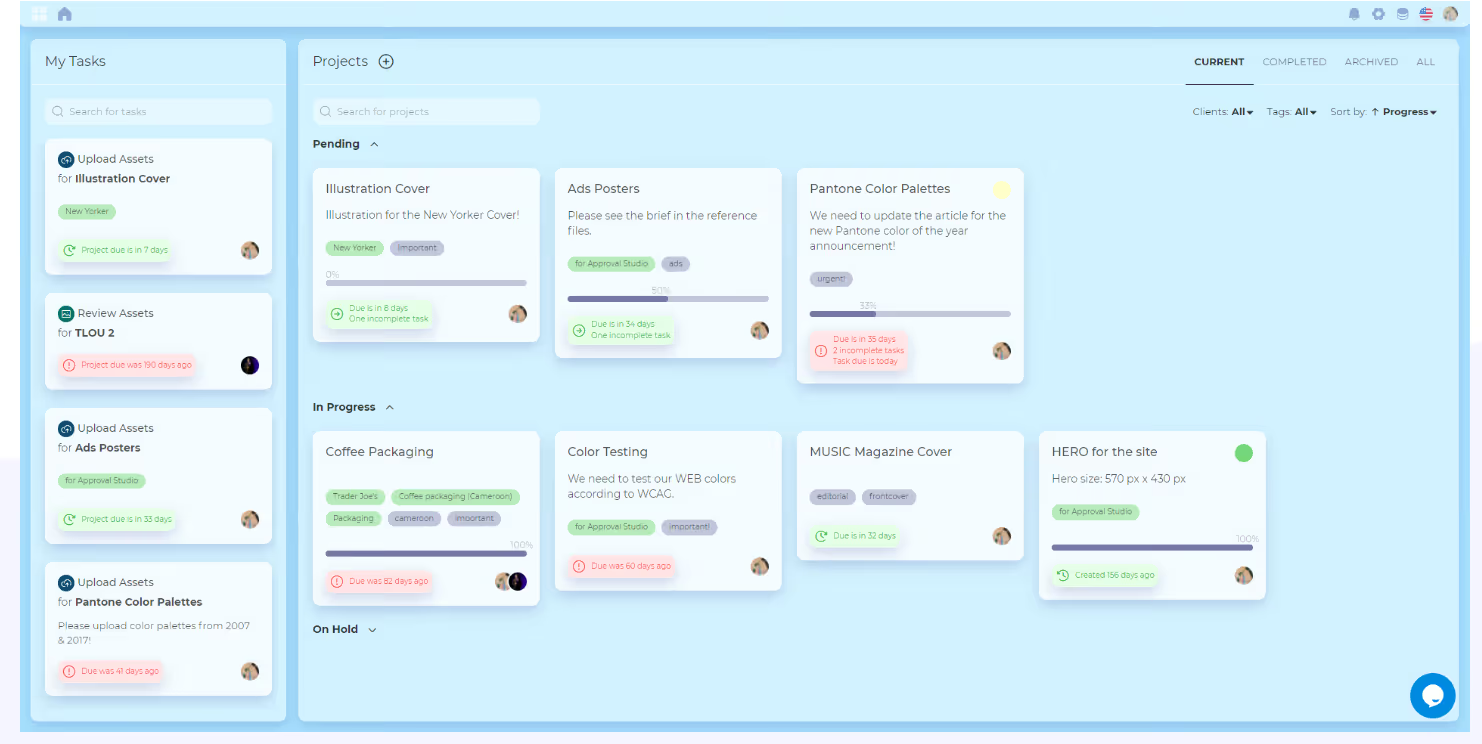
Approval Studio lets you manage the approval process with structured review steps, activity tracking, and notifications.
You can share proofs with specific reviewers or clients, and send them automatic reminders of the deadline for submitting feedback before it affects the entire workflow.
You also get a bird’s-eye view of all projects you’re currently handling from the dashboard, so you know which tasks have been approved, and if a client has missed a deadline for proofing a document.
Every time a file is updated, Approval Studio keeps it in the system with a full version history.
You can also compare versions side by side or use different compare modes to visually see what’s changed between updates.
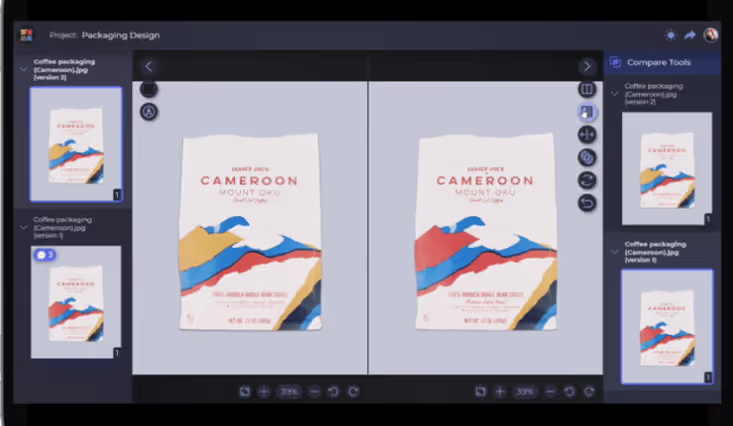
This helps your team confirm that they applied the requested edits correctly
Approval Studio’s UI feels dated compared to their competitors. The feature set is functional but it doesn't have deeper integrations like every other software on this list.
Pricing starts at $60 per month for the Lite, $160 for Pro, $300 for Pro XL, and custom pricing for Enterprise.
There’s no shortage of proofing tools on the market, but the right choice depends on how your agency actually works.
If you only need to simplify asset feedback, tools like Filestage, Ziflow, or GoVisually can do the job, especially if you're managing a high volume of design or video work with lots of external stakeholders.
But if you need more than just markup and approvals, like automated client intake, branded portals, time-tracking, and integrated billing, we recommend ManyRequests. With ManyRequests, you can automatically turn your client's requests into tasks, and monitor those tasks through execution and approval. You can sign up for our 14-days free trial to see how the system works for your creative approval process.
1. See how ManyRequests works in real life. Start a free trial and experience how productized agencies centralize requests, reduce chaos, and streamline delivery, without changing their entire workflow.
2. Read our Implementation Guide to launch smoothly with your team and clients.
3. Follow us on LinkedIn and YouTube for practical agency growth strategies
4. Check out The Productize Blueprint to learn how to turn your services into a scalable, productized offer.
Adetola Rachael Iyanuoluwa is a B2B SaaS writer and content marketer with 4+ years of experience creating SEO, human-focused content. She writes in-depth how-to guides and comparison articles content that help SaaS companies grow organic traffic and turn readers into customers. At ManyRequests, she produces practical, well-researched content that helps agencies and service businesses streamline operations and scale sustainably.

